SynergiTask

SynergiTask

SynergiTask

Web App

Web App

Web App
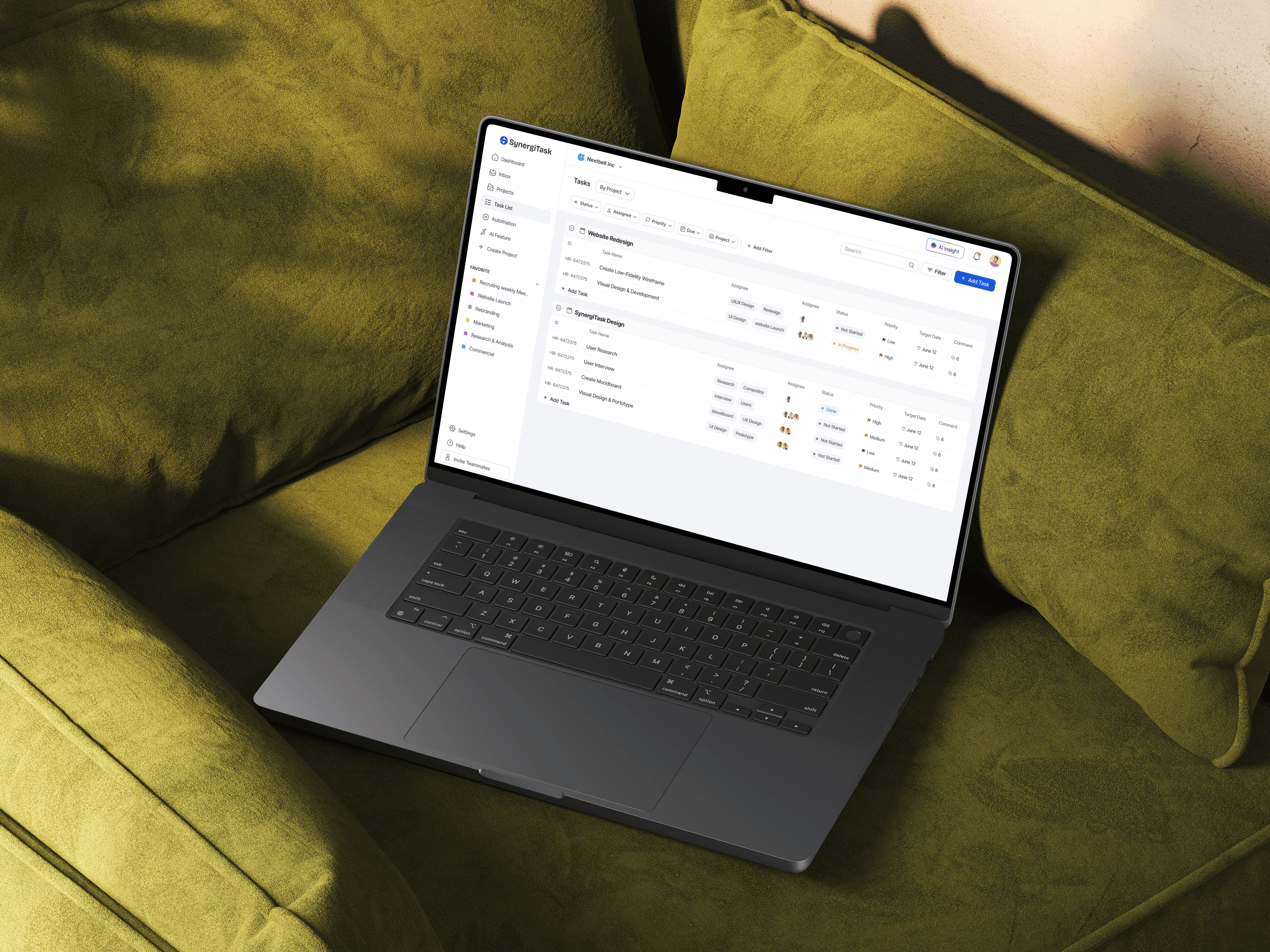
An iPad Pro displaying a landing page analytics website

Overview

Overview

In today’s fast-changing world of project management, teams face countless challenges that stand in the way of efficiency and success. From managing detailed tasks to streamlining complex workflows, the demand for a solution that truly understands — and intelligently solves — these pain points has never been greater. That’s where SynergiTask comes in — the project management tool built for the future.

In today’s fast-changing world of project management, teams face countless challenges that stand in the way of efficiency and success. From managing detailed tasks to streamlining complex workflows, the demand for a solution that truly understands — and intelligently solves — these pain points has never been greater. That’s where SynergiTask comes in — the project management tool built for the future.

In today’s fast-changing world of project management, teams face countless challenges that stand in the way of efficiency and success. From managing detailed tasks to streamlining complex workflows, the demand for a solution that truly understands — and intelligently solves — these pain points has never been greater. That’s where SynergiTask comes in — the project management tool built for the future.

SynergiTask combines innovation and practicality through its powerful AI engine, Synergi AI, designed to transform the way teams work. With Synergi AI, project managers can cut through the clutter of complicated processes, stay in tune with team dynamics, and boost productivity with smart automation that works seamlessly behind the scenes.

SynergiTask combines innovation and practicality through its powerful AI engine, Synergi AI, designed to transform the way teams work. With Synergi AI, project managers can cut through the clutter of complicated processes, stay in tune with team dynamics, and boost productivity with smart automation that works seamlessly behind the scenes.

SynergiTask combines innovation and practicality through its powerful AI engine, Synergi AI, designed to transform the way teams work. With Synergi AI, project managers can cut through the clutter of complicated processes, stay in tune with team dynamics, and boost productivity with smart automation that works seamlessly behind the scenes.

An iPhone 15 displaying a Web3.0 learning app

Tech Stack

Figma

Design Tool

React Native

User Interface Library

Xcode

IDE

Tech Stack

Figma

Design Tool

React Native

User Interface Library

Xcode

IDE

Tech Stack

Figma

Design Tool

React Native

User Interface Library

Xcode

IDE

Tech Stack

Figma

Design Tool

React Native

User Interface Library

Xcode

IDE

ROLE

ROLE

UX Designer & Researcher

DURATION

DURATION

6 Month

PLATFORM

PLATFORM

Task Management Web App
An iPhone 15 displaying a Web3.0 learning app
A web browser displaying a landing page analytics website with a purple background

Process

Process

Design Process

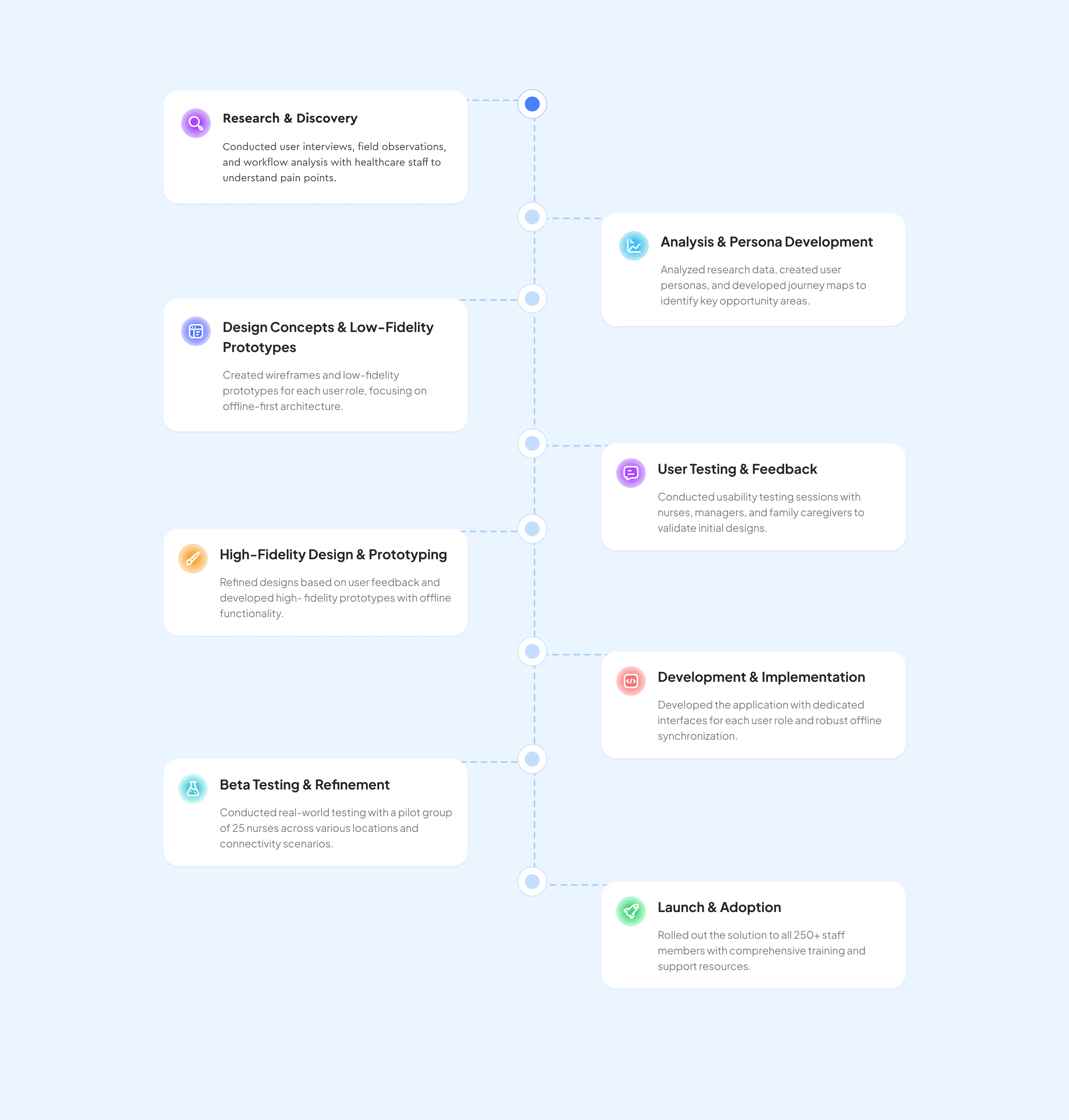
The design journey behind SynergiTask was shaped through an iterative, user-centered approach. It began with in-depth research to uncover real challenges faced in project management, ensuring every decision was grounded in user insight. From there, we moved on to sketching and wireframing, crafting a clean and functional foundation that focused on simplicity and ease of use. Prototyping and user testing were key stages of the process — enabling us to gather feedback, refine the experience, and create a product that truly meets users’ needs.


Design Process

The design journey behind SynergiTask was shaped through an iterative, user-centered approach. It began with in-depth research to uncover real challenges faced in project management, ensuring every decision was grounded in user insight. From there, we moved on to sketching and wireframing, crafting a clean and functional foundation that focused on simplicity and ease of use. Prototyping and user testing were key stages of the process — enabling us to gather feedback, refine the experience, and create a product that truly meets users’ needs.


Design Process

The design journey behind SynergiTask was shaped through an iterative, user-centered approach. It began with in-depth research to uncover real challenges faced in project management, ensuring every decision was grounded in user insight. From there, we moved on to sketching and wireframing, crafting a clean and functional foundation that focused on simplicity and ease of use. Prototyping and user testing were key stages of the process — enabling us to gather feedback, refine the experience, and create a product that truly meets users’ needs.


Design Process

The design journey behind SynergiTask was shaped through an iterative, user-centered approach. It began with in-depth research to uncover real challenges faced in project management, ensuring every decision was grounded in user insight. From there, we moved on to sketching and wireframing, crafting a clean and functional foundation that focused on simplicity and ease of use. Prototyping and user testing were key stages of the process — enabling us to gather feedback, refine the experience, and create a product that truly meets users’ needs.


Challenges & Solutions

Project management often involves scattered tasks, complex workflows, and communication gaps that can slow teams down. SynergiTask bridges these challenges with an intuitive, AI-powered platform that simplifies task management, streamlines collaboration, and brings clarity to every stage of a project — helping teams work smarter, faster, and with greater confidence.

Challenges

  • Managing Project Complexity: Modern projects can feel like a maze — tangled workflows, unclear task statuses, and uneven workloads make it hard for teams to stay focused and motivated under pressure.

  • Keeping Tasks Clear and Consistent: Writing detailed tasks takes time, and without clear standards, information often gets lost. This creates confusion and slows down collaboration and handovers.

  • Simplifying Workflow Tracking: Manual monitoring drains time and energy. Constantly checking updates and progress often leads to missed details and communication gaps, pulling focus away from real progress.

The SynergiTask Solution

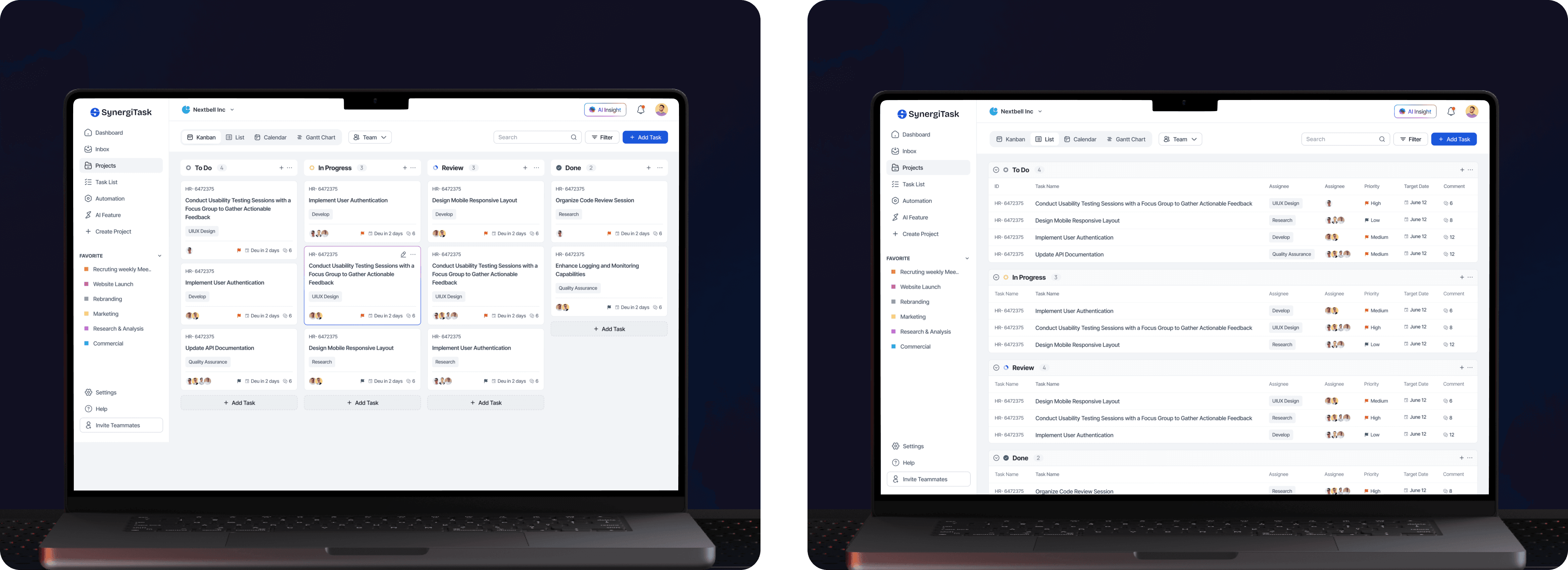
  • Simplified Project Management: SynergiTask turns complex workflows into clear, visual progress. With an intuitive Kanban board and flexible views, such as List, Calendar, and Gantt Chart, teams can easily see what’s happening and stay focused on what matters most.

  • Smarter Task Organization: Each task card captures everything teams need — from deadlines to assignees — keeping communication clear and handovers smooth. No more chasing updates or missing details.

  • AI That Works With You: Synergi AI offers smart suggestions, helps spot bottlenecks early, and keeps workloads balanced so projects move forward without the chaos.

  • Built for Collaboration: With real-time updates and shared visibility, everyone stays connected and aligned — no matter where they’re working from.

Challenges & Solutions

Project management often involves scattered tasks, complex workflows, and communication gaps that can slow teams down. SynergiTask bridges these challenges with an intuitive, AI-powered platform that simplifies task management, streamlines collaboration, and brings clarity to every stage of a project — helping teams work smarter, faster, and with greater confidence.

Challenges

  • Managing Project Complexity: Modern projects can feel like a maze — tangled workflows, unclear task statuses, and uneven workloads make it hard for teams to stay focused and motivated under pressure.

  • Keeping Tasks Clear and Consistent: Writing detailed tasks takes time, and without clear standards, information often gets lost. This creates confusion and slows down collaboration and handovers.

  • Simplifying Workflow Tracking: Manual monitoring drains time and energy. Constantly checking updates and progress often leads to missed details and communication gaps, pulling focus away from real progress.

The SynergiTask Solution

  • Simplified Project Management: SynergiTask turns complex workflows into clear, visual progress. With an intuitive Kanban board and flexible views, such as List, Calendar, and Gantt Chart, teams can easily see what’s happening and stay focused on what matters most.

  • Smarter Task Organization: Each task card captures everything teams need — from deadlines to assignees — keeping communication clear and handovers smooth. No more chasing updates or missing details.

  • AI That Works With You: Synergi AI offers smart suggestions, helps spot bottlenecks early, and keeps workloads balanced so projects move forward without the chaos.

  • Built for Collaboration: With real-time updates and shared visibility, everyone stays connected and aligned — no matter where they’re working from.


Challenges & Solutions

Project management often involves scattered tasks, complex workflows, and communication gaps that can slow teams down. SynergiTask bridges these challenges with an intuitive, AI-powered platform that simplifies task management, streamlines collaboration, and brings clarity to every stage of a project — helping teams work smarter, faster, and with greater confidence.

Challenges

  • Managing Project Complexity: Modern projects can feel like a maze — tangled workflows, unclear task statuses, and uneven workloads make it hard for teams to stay focused and motivated under pressure.

  • Keeping Tasks Clear and Consistent: Writing detailed tasks takes time, and without clear standards, information often gets lost. This creates confusion and slows down collaboration and handovers.

  • Simplifying Workflow Tracking: Manual monitoring drains time and energy. Constantly checking updates and progress often leads to missed details and communication gaps, pulling focus away from real progress.

The SynergiTask Solution

  • Simplified Project Management: SynergiTask turns complex workflows into clear, visual progress. With an intuitive Kanban board and flexible views, such as List, Calendar, and Gantt Chart, teams can easily see what’s happening and stay focused on what matters most.

  • Smarter Task Organization: Each task card captures everything teams need — from deadlines to assignees — keeping communication clear and handovers smooth. No more chasing updates or missing details.

  • AI That Works With You: Synergi AI offers smart suggestions, helps spot bottlenecks early, and keeps workloads balanced so projects move forward without the chaos.

  • Built for Collaboration: With real-time updates and shared visibility, everyone stays connected and aligned — no matter where they’re working from.


Research

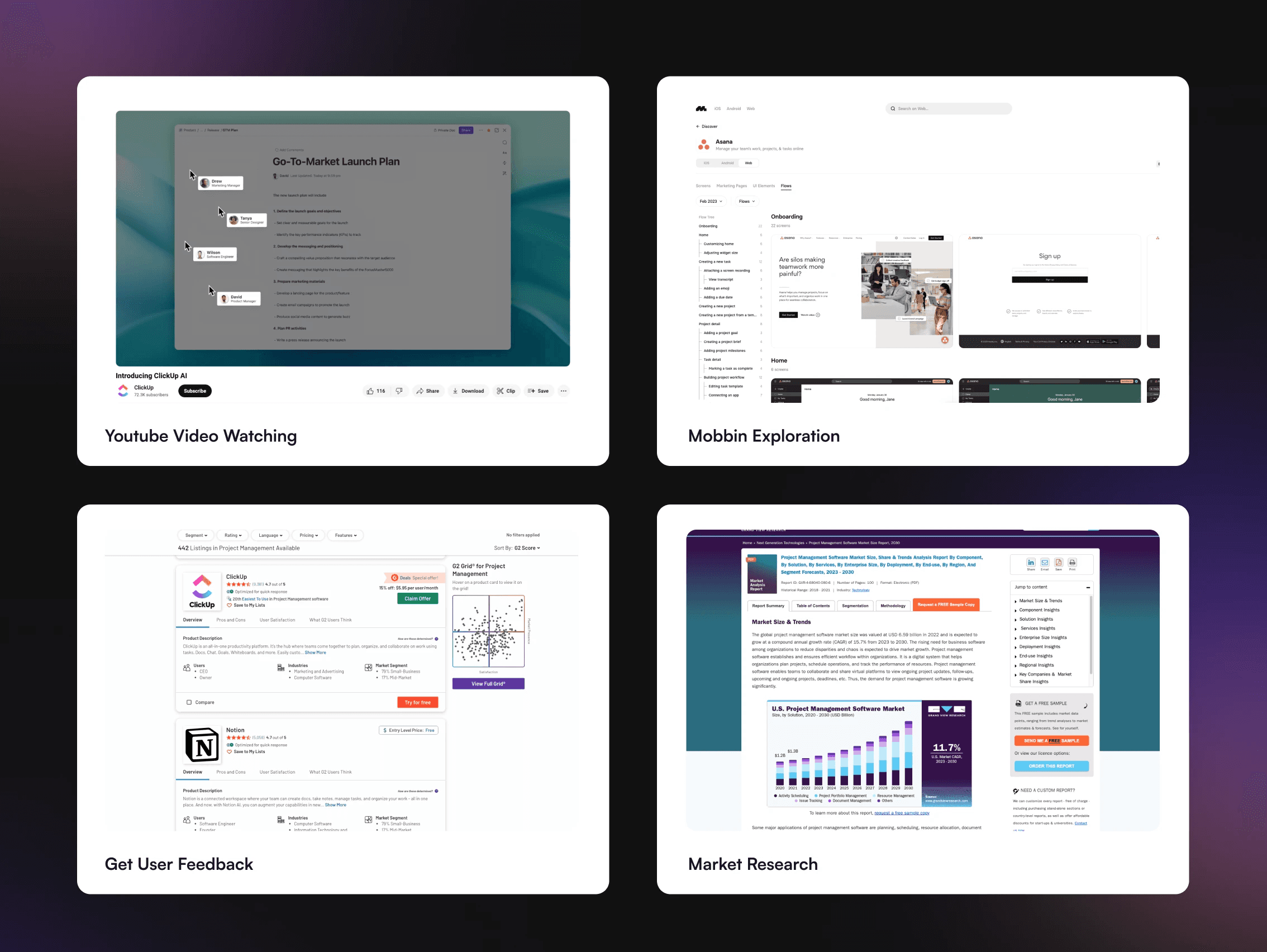
Our research journey included in-depth user interviews, competitive analysis, and a close look at real workflow patterns. Through this, we uncovered key gaps in today’s project management tools — areas where teams felt frustrated or unsupported. These insights shaped the foundation of SynergiTask, helping us design a solution built around real user needs and market realities. The result is an intuitive, future-ready platform that simplifies collaboration and elevates team efficiency.


Research

Our research journey included in-depth user interviews, competitive analysis, and a close look at real workflow patterns. Through this, we uncovered key gaps in today’s project management tools — areas where teams felt frustrated or unsupported. These insights shaped the foundation of SynergiTask, helping us design a solution built around real user needs and market realities. The result is an intuitive, future-ready platform that simplifies collaboration and elevates team efficiency.


Research

Our research journey included in-depth user interviews, competitive analysis, and a close look at real workflow patterns. Through this, we uncovered key gaps in today’s project management tools — areas where teams felt frustrated or unsupported. These insights shaped the foundation of SynergiTask, helping us design a solution built around real user needs and market realities. The result is an intuitive, future-ready platform that simplifies collaboration and elevates team efficiency.


User Persona

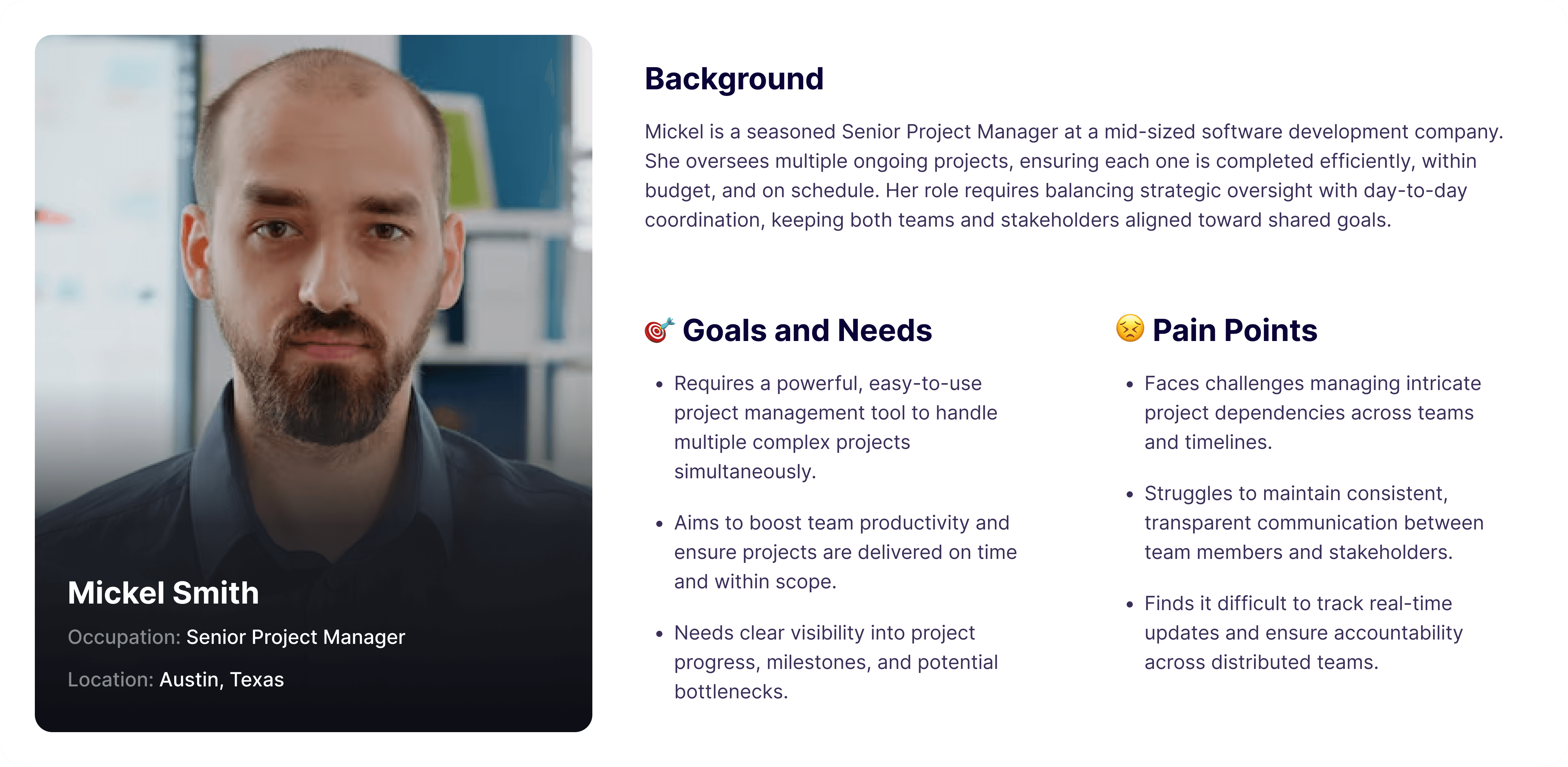
As part of our research, we created two user personas to capture the needs of our core audience. Informed by surveys and interviews, these personas highlight user goals, challenges, and motivations, ensuring the Money OS app redesign stays grounded in real experiences. They served as a foundation for feature prioritization and design decisions, directly addressing key scenarios in money management.


User Persona

As part of our research, we created two user personas to capture the needs of our core audience. Informed by surveys and interviews, these personas highlight user goals, challenges, and motivations, ensuring the Money OS app redesign stays grounded in real experiences. They served as a foundation for feature prioritization and design decisions, directly addressing key scenarios in money management.


User Persona

As part of our research, we created two user personas to capture the needs of our core audience. Informed by surveys and interviews, these personas highlight user goals, challenges, and motivations, ensuring the Money OS app redesign stays grounded in real experiences. They served as a foundation for feature prioritization and design decisions, directly addressing key scenarios in money management.


Competitive Analysis

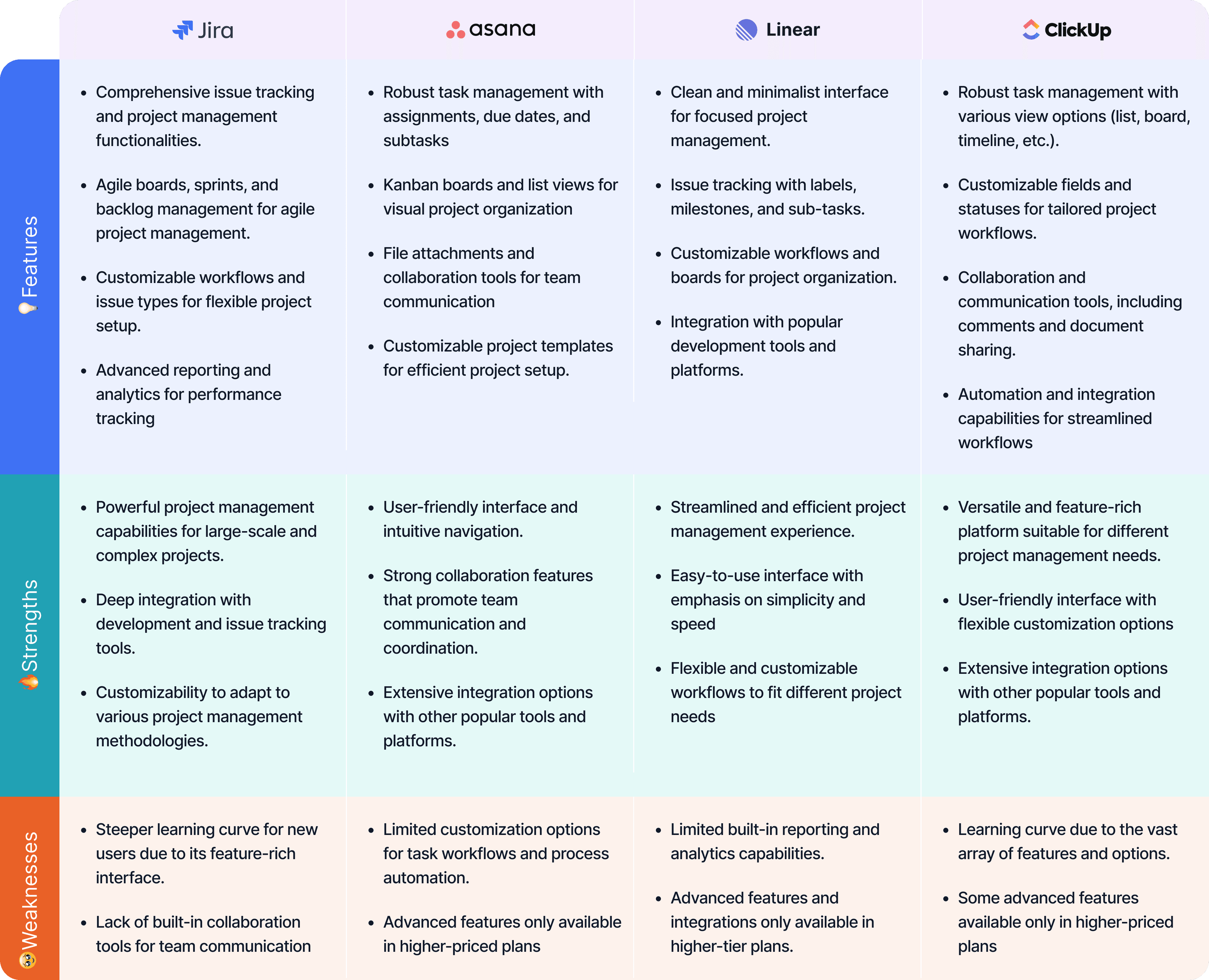
The competitive analysis explored the current project management landscape, identifying both the strengths and shortcomings of leading platforms. Our research revealed a clear opportunity for a more intuitive, AI-powered solution — one that simplifies workflows, enhances collaboration, and reduces the friction teams often face with complex tools. SynergiTask was built to bridge that gap, combining intelligent automation with a user-first design to create a seamless, adaptable experience for modern project teams.


Competitive Analysis

The competitive analysis explored the current project management landscape, identifying both the strengths and shortcomings of leading platforms. Our research revealed a clear opportunity for a more intuitive, AI-powered solution — one that simplifies workflows, enhances collaboration, and reduces the friction teams often face with complex tools. SynergiTask was built to bridge that gap, combining intelligent automation with a user-first design to create a seamless, adaptable experience for modern project teams.


Competitive Analysis

The competitive analysis explored the current project management landscape, identifying both the strengths and shortcomings of leading platforms. Our research revealed a clear opportunity for a more intuitive, AI-powered solution — one that simplifies workflows, enhances collaboration, and reduces the friction teams often face with complex tools. SynergiTask was built to bridge that gap, combining intelligent automation with a user-first design to create a seamless, adaptable experience for modern project teams.


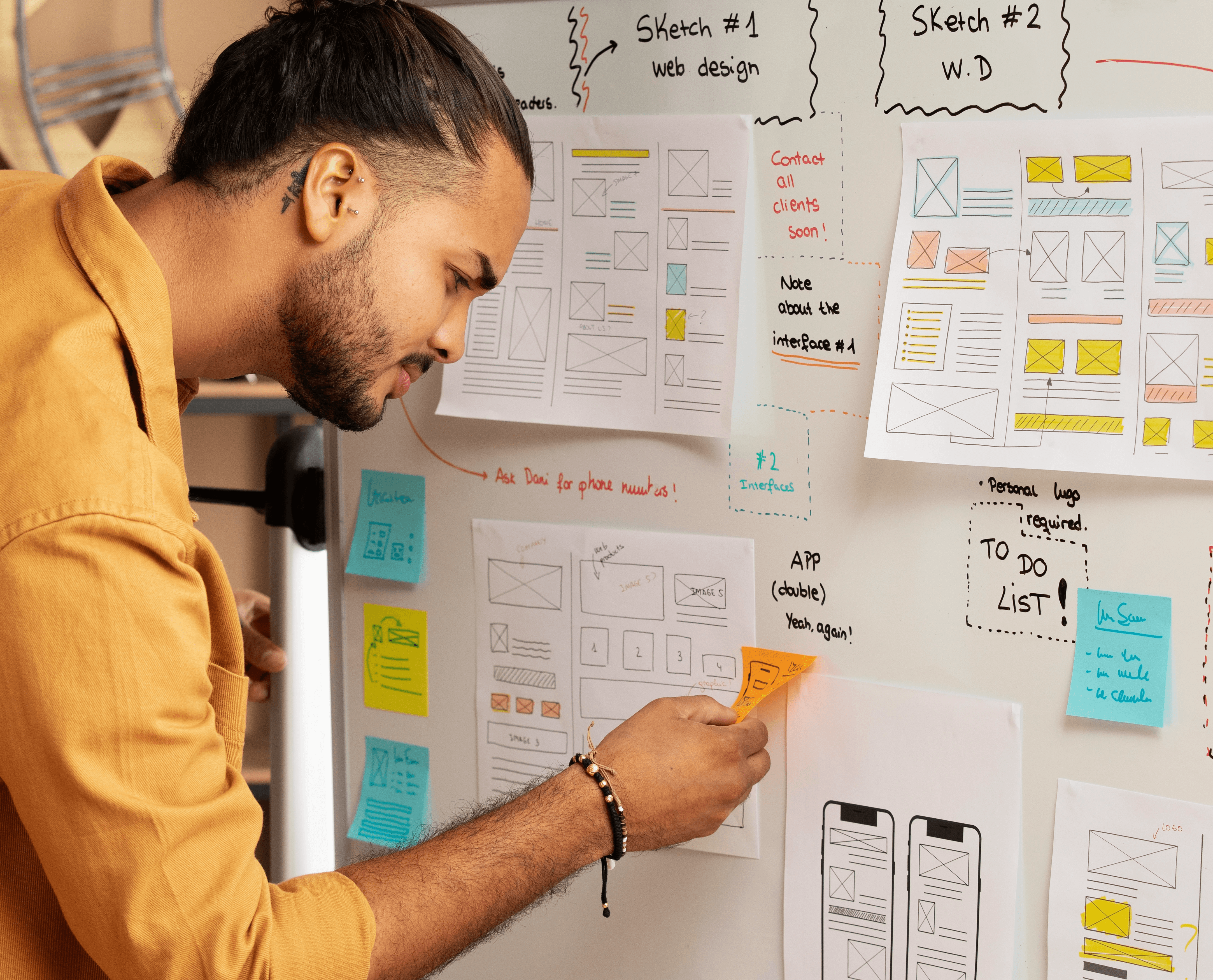
Wireframe

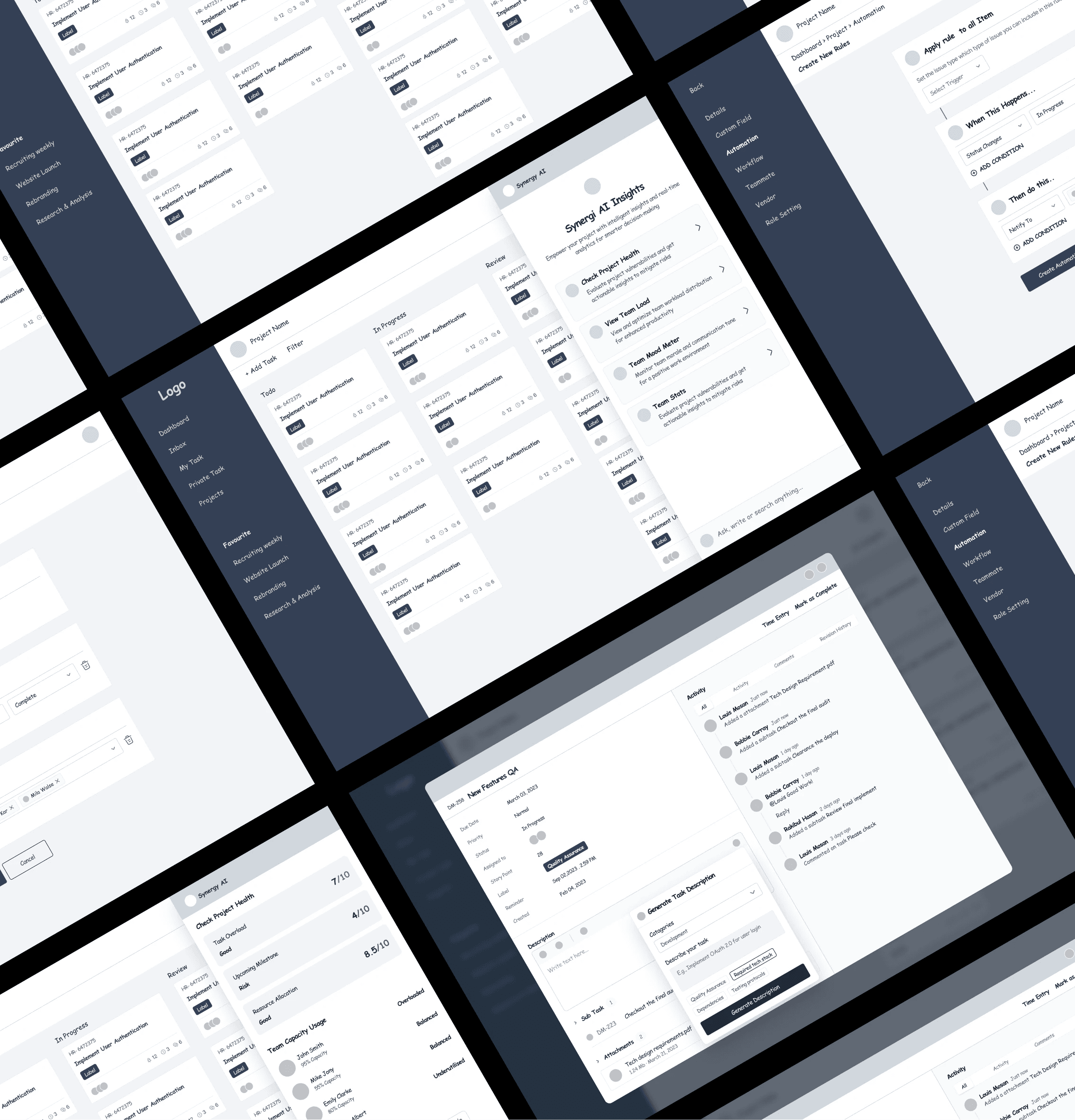
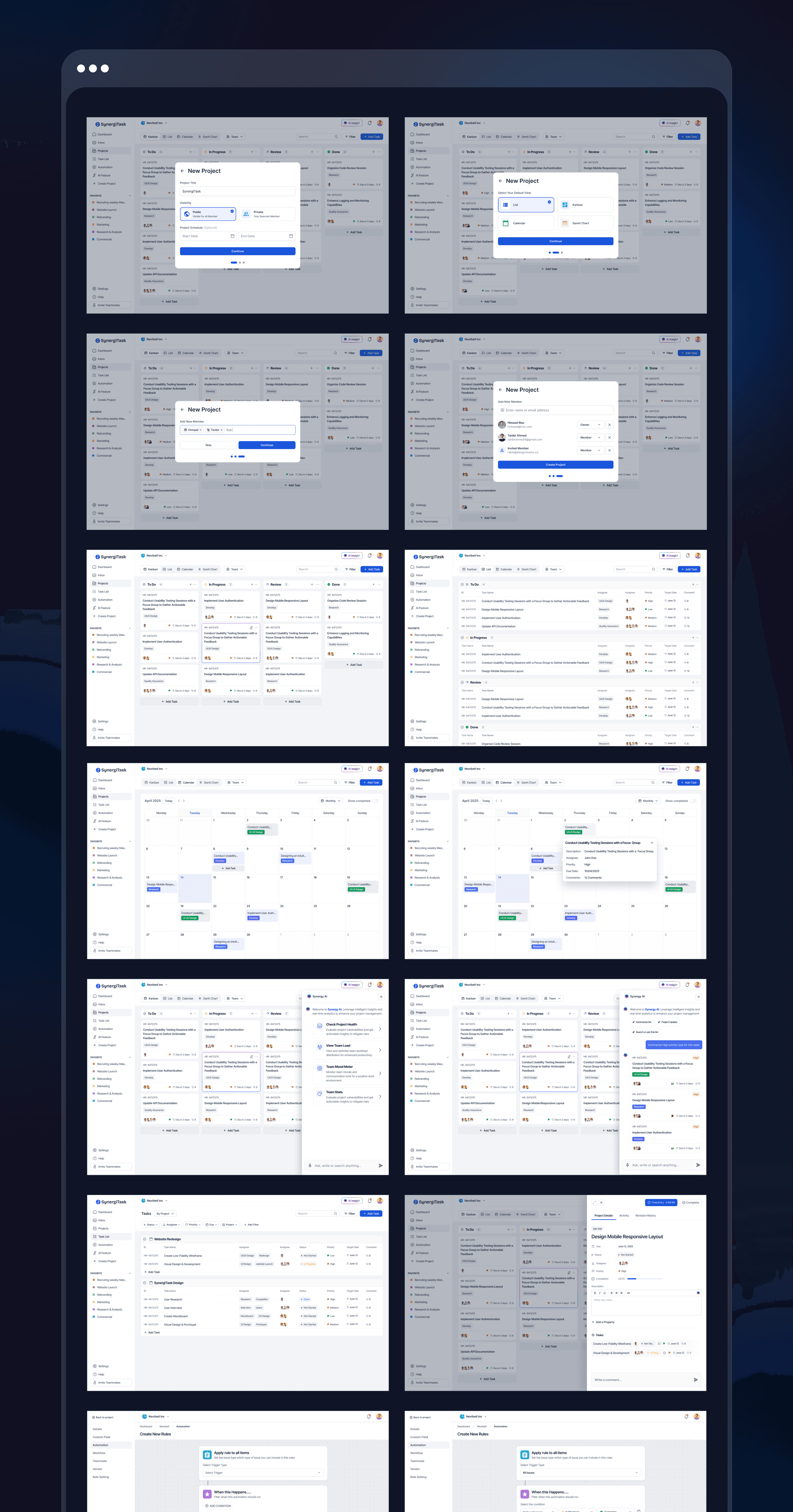
Wireframes form the foundation of SynergiTask, acting as a visual blueprint for the platform’s interface. They help map out the user journey, define core interactions, and ensure every element serves a clear purpose. By focusing on structure and usability early on, we built an experience that feels intuitive, functional, and truly aligned with user needs.


Wireframe

Wireframes form the foundation of SynergiTask, acting as a visual blueprint for the platform’s interface. They help map out the user journey, define core interactions, and ensure every element serves a clear purpose. By focusing on structure and usability early on, we built an experience that feels intuitive, functional, and truly aligned with user needs.


Wireframe

Wireframes form the foundation of SynergiTask, acting as a visual blueprint for the platform’s interface. They help map out the user journey, define core interactions, and ensure every element serves a clear purpose. By focusing on structure and usability early on, we built an experience that feels intuitive, functional, and truly aligned with user needs.


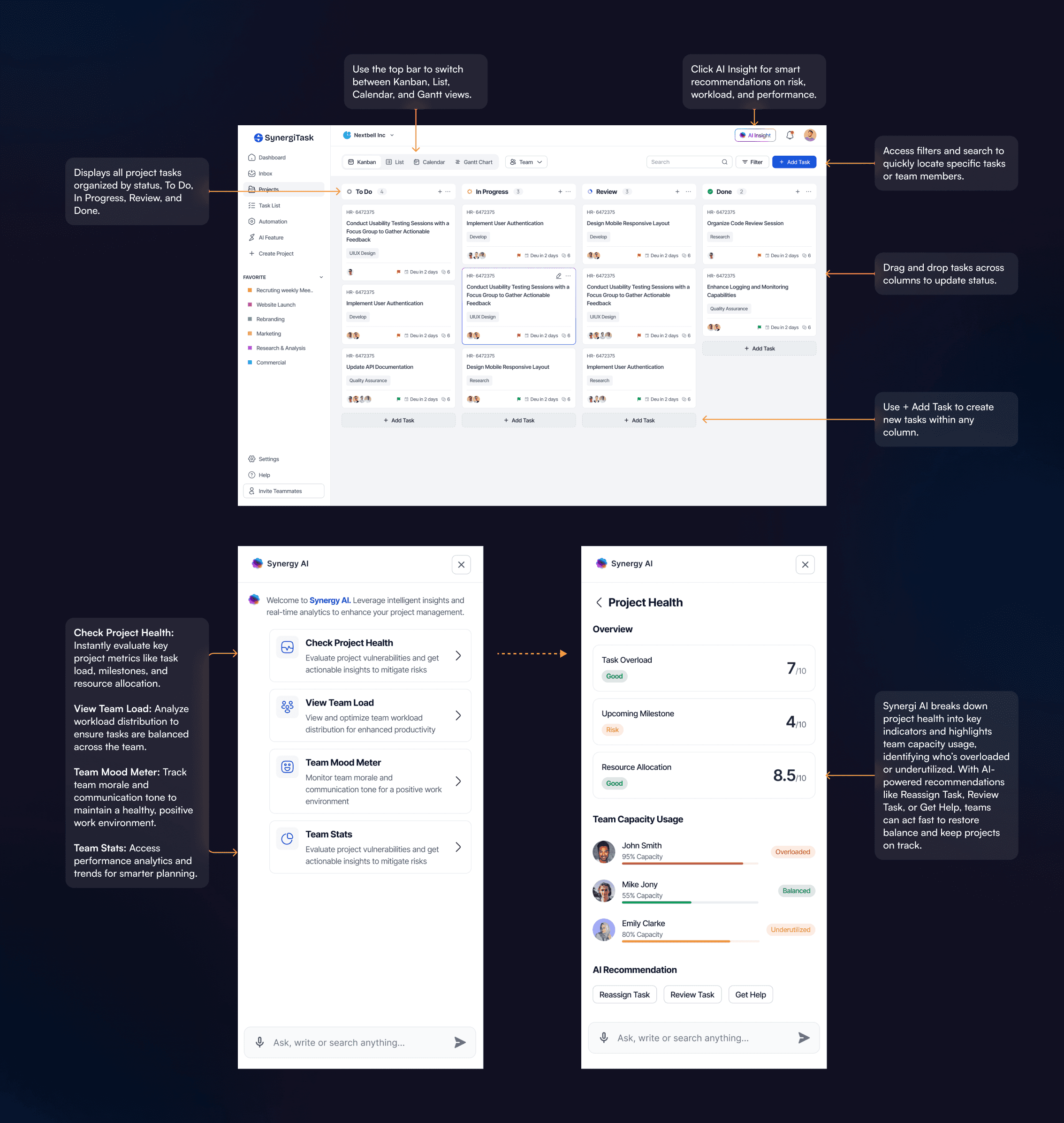
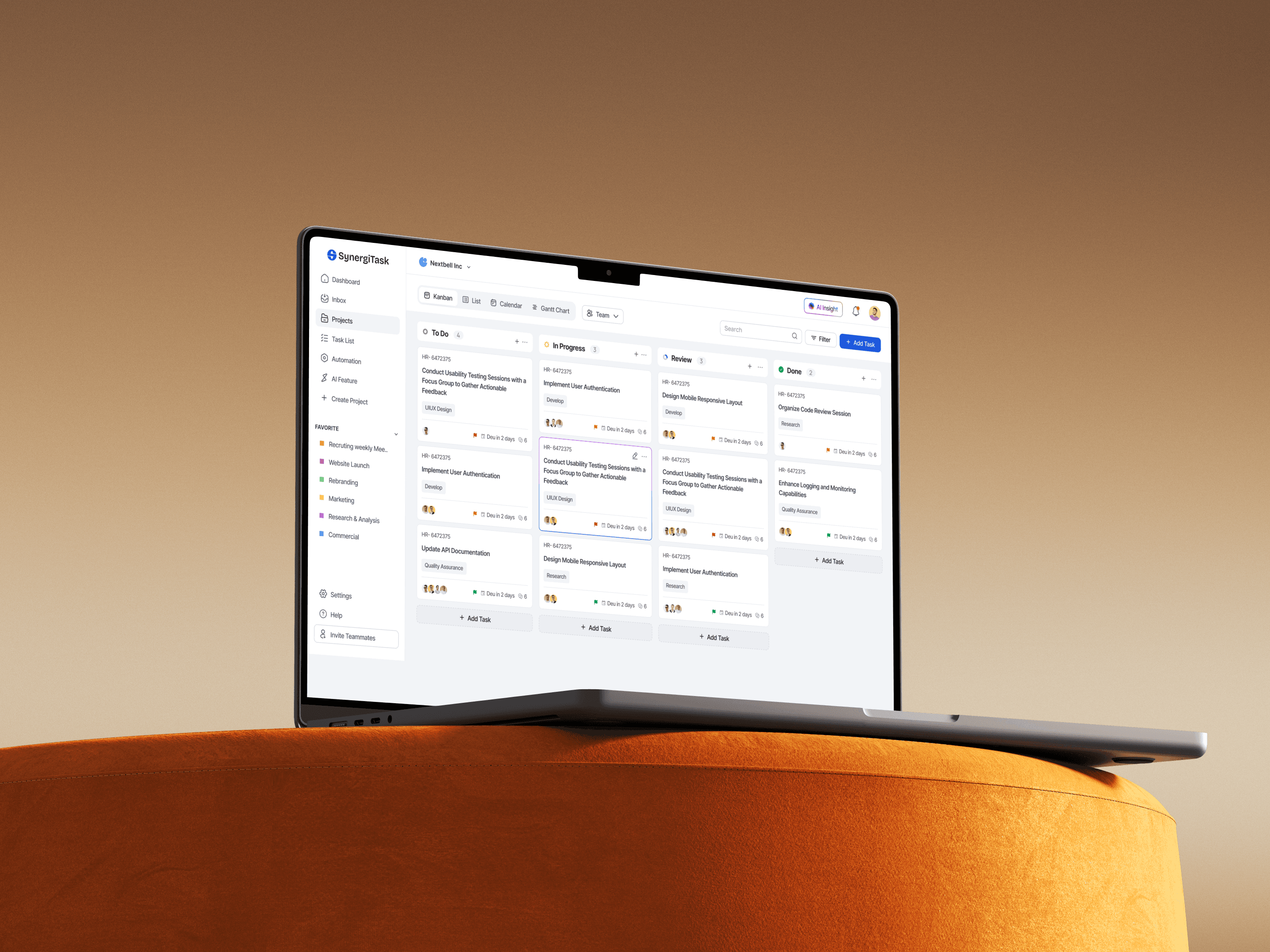
Introducing Synergi AI on the Project Board

Meet Synergi AI, your intelligent project companion built right into the Kanban board. It delivers real-time insights to help you spot risks early, balance team workloads, and understand overall progress at a glance. With Synergi AI, project management becomes smarter, smoother, and more human-centered.


Key Interactions:

  • Drag and drop tasks between columns to update their status.

  • Switch between Kanban, List, Calendar, and Gantt views from the top navigation bar.

  • Access AI Insight for real-time recommendations on risk, workload, and overall performance.

  • Click + Add Task to create new tasks within any status column.

  • Use the Filter and Search features to locate specific tasks, projects, or team members easily.


Synergi AI — Intelligent Project Assistant

The Synergi AI sidebar acts as a built-in project intelligence companion, offering real-time insights to help managers and teams make informed, data-driven decisions.


  • Check Project Health: Evaluate overall project status by analyzing workload, milestones, and resource allocation.

  • View Team Load: Visualize workload distribution to ensure tasks are assigned fairly and efficiently.

  • Team Mood Meter: Measure team morale and communication tone to maintain a balanced work environment.

  • Team Stats: Access detailed analytics and performance trends for improved planning and forecasting.

The detailed Project Health view highlights critical project indicators and visualizes team capacity levels—identifying who is overloaded, balanced, or underutilized. Through AI-powered suggestions like Reassign Task, Review Task, or Get Help, Synergi AI enables proactive action to optimize team performance and maintain project stability.


Introducing Synergi AI on the Project Board

Meet Synergi AI, your intelligent project companion built right into the Kanban board. It delivers real-time insights to help you spot risks early, balance team workloads, and understand overall progress at a glance. With Synergi AI, project management becomes smarter, smoother, and more human-centered.


Key Interactions:

  • Drag and drop tasks between columns to update their status.

  • Switch between Kanban, List, Calendar, and Gantt views from the top navigation bar.

  • Access AI Insight for real-time recommendations on risk, workload, and overall performance.

  • Click + Add Task to create new tasks within any status column.

  • Use the Filter and Search features to locate specific tasks, projects, or team members easily.


Synergi AI — Intelligent Project Assistant

The Synergi AI sidebar acts as a built-in project intelligence companion, offering real-time insights to help managers and teams make informed, data-driven decisions.


  • Check Project Health: Evaluate overall project status by analyzing workload, milestones, and resource allocation.

  • View Team Load: Visualize workload distribution to ensure tasks are assigned fairly and efficiently.

  • Team Mood Meter: Measure team morale and communication tone to maintain a balanced work environment.

  • Team Stats: Access detailed analytics and performance trends for improved planning and forecasting.

The detailed Project Health view highlights critical project indicators and visualizes team capacity levels—identifying who is overloaded, balanced, or underutilized. Through AI-powered suggestions like Reassign Task, Review Task, or Get Help, Synergi AI enables proactive action to optimize team performance and maintain project stability.


Introducing Synergi AI on the Project Board

Meet Synergi AI, your intelligent project companion built right into the Kanban board. It delivers real-time insights to help you spot risks early, balance team workloads, and understand overall progress at a glance. With Synergi AI, project management becomes smarter, smoother, and more human-centered.


Key Interactions:

  • Drag and drop tasks between columns to update their status.

  • Switch between Kanban, List, Calendar, and Gantt views from the top navigation bar.

  • Access AI Insight for real-time recommendations on risk, workload, and overall performance.

  • Click + Add Task to create new tasks within any status column.

  • Use the Filter and Search features to locate specific tasks, projects, or team members easily.


Synergi AI — Intelligent Project Assistant

The Synergi AI sidebar acts as a built-in project intelligence companion, offering real-time insights to help managers and teams make informed, data-driven decisions.


  • Check Project Health: Evaluate overall project status by analyzing workload, milestones, and resource allocation.

  • View Team Load: Visualize workload distribution to ensure tasks are assigned fairly and efficiently.

  • Team Mood Meter: Measure team morale and communication tone to maintain a balanced work environment.

  • Team Stats: Access detailed analytics and performance trends for improved planning and forecasting.

The detailed Project Health view highlights critical project indicators and visualizes team capacity levels—identifying who is overloaded, balanced, or underutilized. Through AI-powered suggestions like Reassign Task, Review Task, or Get Help, Synergi AI enables proactive action to optimize team performance and maintain project stability.


Project Detail View

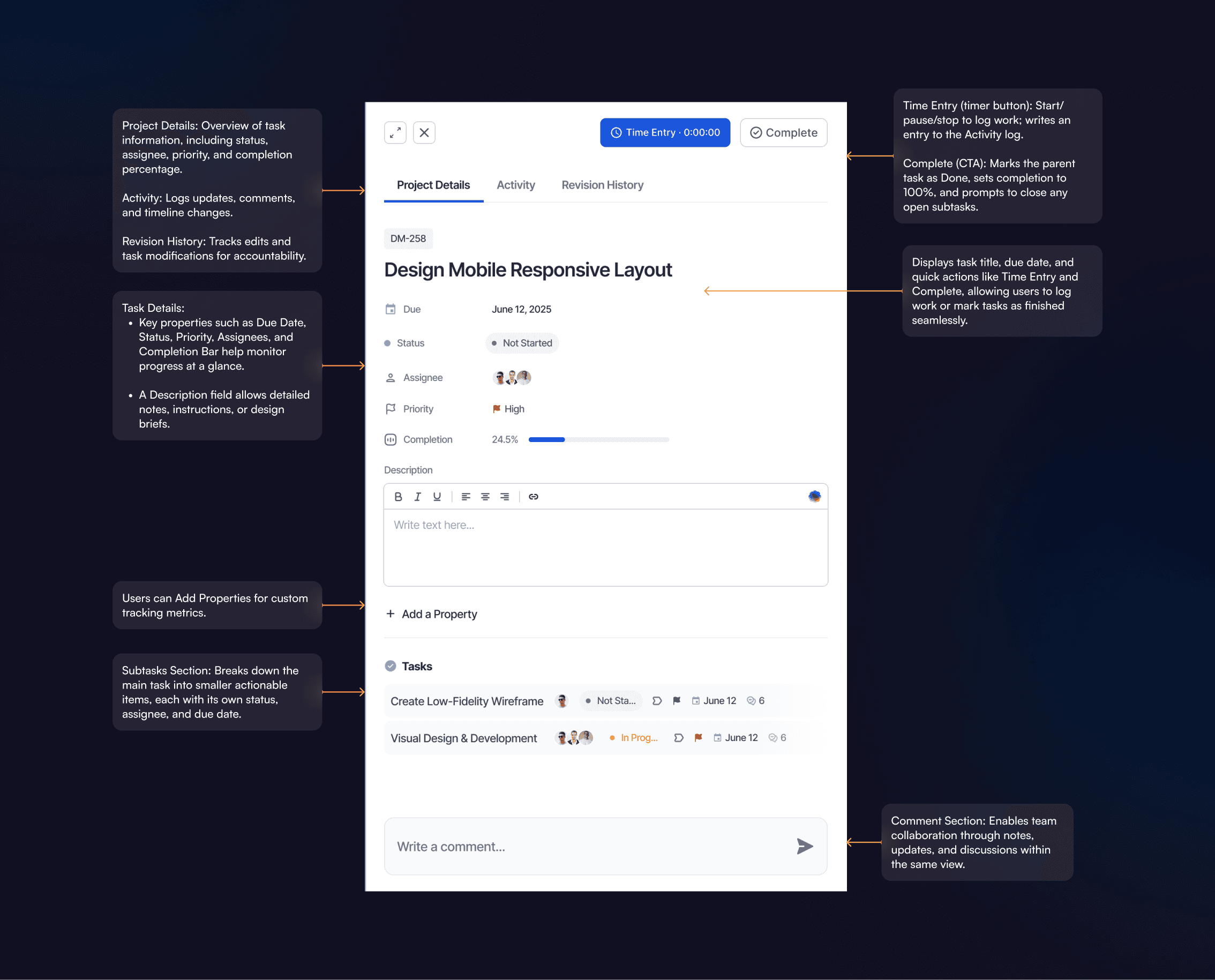
This screen provides a comprehensive view of an individual project or task, helping teams monitor progress, manage resources, and maintain clarity throughout execution.

  • Time Entry (timer button): Start/pause/stop to log work; writes an entry to the Activity log.

  • Complete (CTA): Marks the parent task as Done, sets completion to 100%, and prompts to close any open subtasks.

  • Core Fields: Due Date, Status, Assignees, Priority, Completion bar.

  • Description: Rich-text area for requirements/notes; supports links and formatting.

  • Custom Properties: Add fields (e.g., Estimate, Sprint, Labels) for team-specific tracking.

  • Subtasks: Each subtask shows status, assignee, due date, and comment count.

  • Collaboration: Comment box at the bottom; posts appear in Activity and send notifications.

Project Detail View

This screen provides a comprehensive view of an individual project or task, helping teams monitor progress, manage resources, and maintain clarity throughout execution.

  • Time Entry (timer button): Start/pause/stop to log work; writes an entry to the Activity log.

  • Complete (CTA): Marks the parent task as Done, sets completion to 100%, and prompts to close any open subtasks.

  • Core Fields: Due Date, Status, Assignees, Priority, Completion bar.

  • Description: Rich-text area for requirements/notes; supports links and formatting.

  • Custom Properties: Add fields (e.g., Estimate, Sprint, Labels) for team-specific tracking.

  • Subtasks: Each subtask shows status, assignee, due date, and comment count.

  • Collaboration: Comment box at the bottom; posts appear in Activity and send notifications.


Project Detail View

This screen provides a comprehensive view of an individual project or task, helping teams monitor progress, manage resources, and maintain clarity throughout execution.

  • Time Entry (timer button): Start/pause/stop to log work; writes an entry to the Activity log.

  • Complete (CTA): Marks the parent task as Done, sets completion to 100%, and prompts to close any open subtasks.

  • Core Fields: Due Date, Status, Assignees, Priority, Completion bar.

  • Description: Rich-text area for requirements/notes; supports links and formatting.

  • Custom Properties: Add fields (e.g., Estimate, Sprint, Labels) for team-specific tracking.

  • Subtasks: Each subtask shows status, assignee, due date, and comment count.

  • Collaboration: Comment box at the bottom; posts appear in Activity and send notifications.


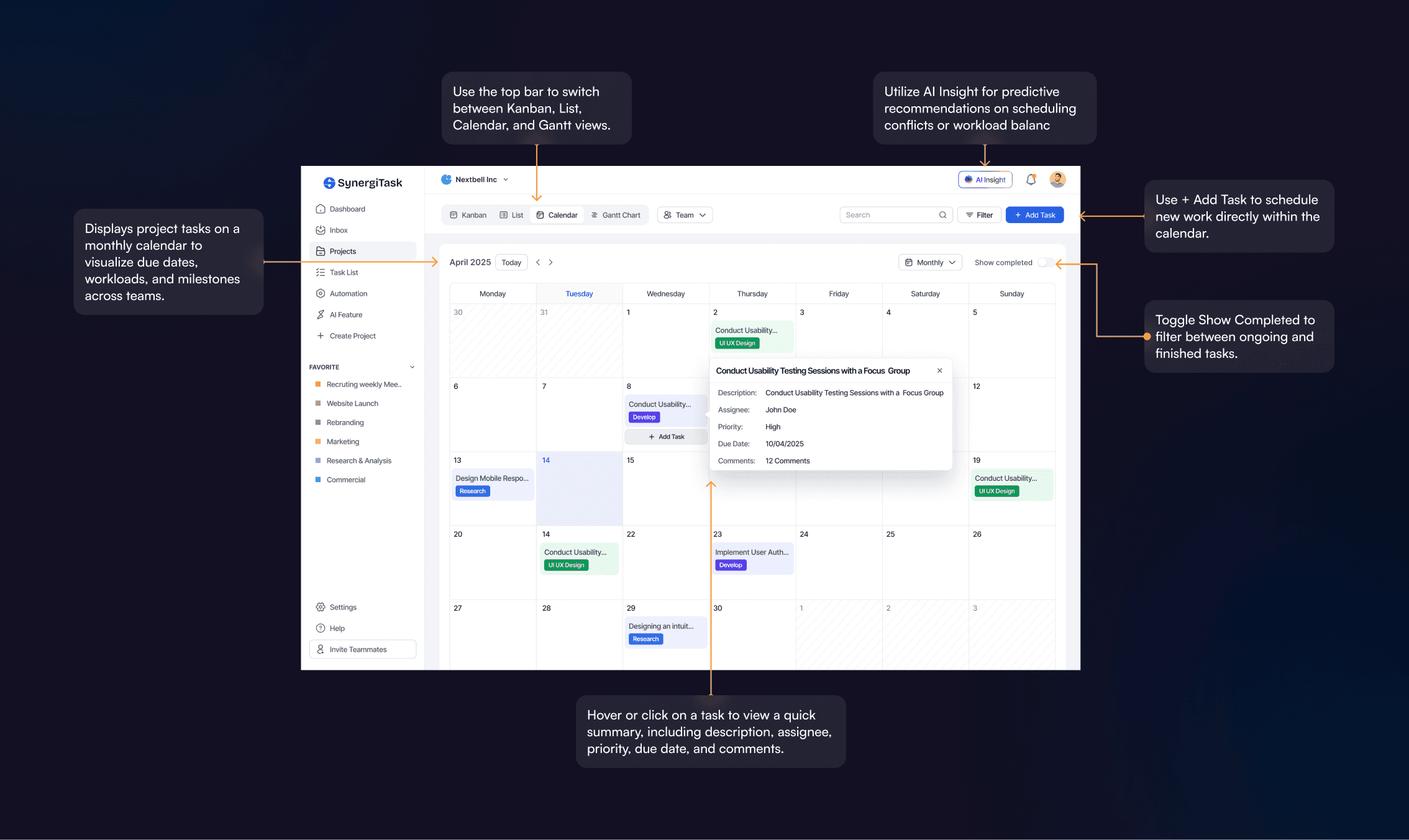
Project Calendar View

This calendar screen provides a clear, time-based overview of all ongoing and upcoming project tasks, helping teams plan efficiently and stay on schedule.


Key Interactions:

  • Switch between Kanban, List, Calendar, and Gantt views from the top navigation.

  • Hover or click on a task to view a quick summary, including description, assignee, priority, due date, and comments.

  • Use + Add Task to schedule new work directly within the calendar.

  • Toggle Show Completed to filter between ongoing and finished tasks.

  • Utilize AI Insight for predictive recommendations on scheduling conflicts or workload balance.

This view makes project timelines more transparent, allowing teams to anticipate bottlenecks, align priorities, and manage deadlines effortlessly.


Project Calendar View

This calendar screen provides a clear, time-based overview of all ongoing and upcoming project tasks, helping teams plan efficiently and stay on schedule.


Key Interactions:

  • Switch between Kanban, List, Calendar, and Gantt views from the top navigation.

  • Hover or click on a task to view a quick summary, including description, assignee, priority, due date, and comments.

  • Use + Add Task to schedule new work directly within the calendar.

  • Toggle Show Completed to filter between ongoing and finished tasks.

  • Utilize AI Insight for predictive recommendations on scheduling conflicts or workload balance.

This view makes project timelines more transparent, allowing teams to anticipate bottlenecks, align priorities, and manage deadlines effortlessly.


Project Calendar View

This calendar screen provides a clear, time-based overview of all ongoing and upcoming project tasks, helping teams plan efficiently and stay on schedule.


Key Interactions:

  • Switch between Kanban, List, Calendar, and Gantt views from the top navigation.

  • Hover or click on a task to view a quick summary, including description, assignee, priority, due date, and comments.

  • Use + Add Task to schedule new work directly within the calendar.

  • Toggle Show Completed to filter between ongoing and finished tasks.

  • Utilize AI Insight for predictive recommendations on scheduling conflicts or workload balance.

This view makes project timelines more transparent, allowing teams to anticipate bottlenecks, align priorities, and manage deadlines effortlessly.


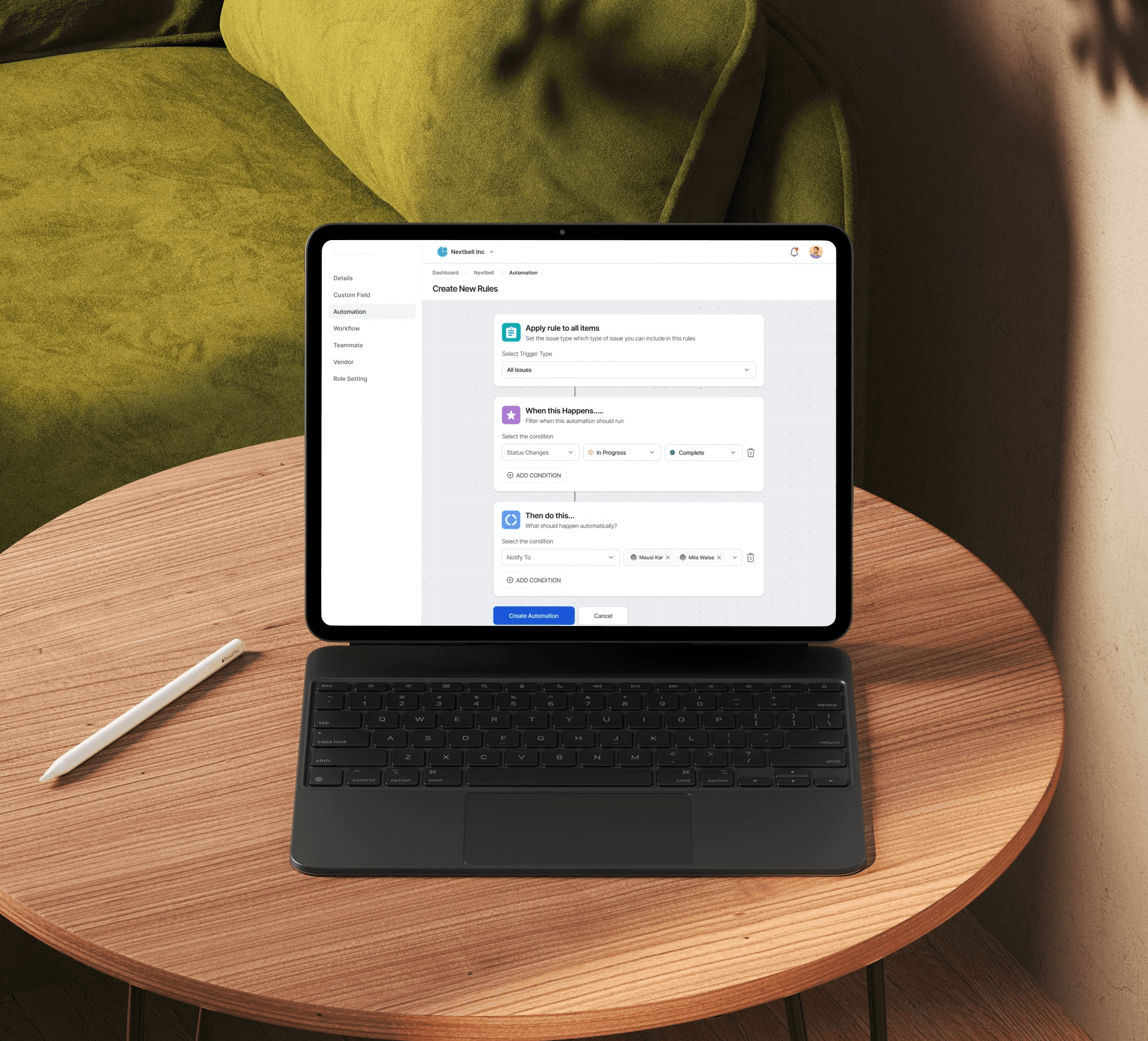
Automation Rules — Workflow Optimization

These screens demonstrate the automation setup flow, enabling users to streamline repetitive tasks and enhance project efficiency through rule-based logic.

Key Sections:

  • Apply Rule to All Items: Defines the scope of automation (e.g., All Issues or selected task types).

  • When This Happens: Sets the trigger condition, such as Status Changes from In Progress to Complete.

  • Then Do This: Specifies the automated action, like notifying selected teammates (e.g., Mauri Kar and Mila Watse).

Interactions:

  • Add or remove conditions for greater flexibility.

  • Click Create Automation to activate the rule, or Cancel to discard changes.

  • Real-time updates ensure the automation applies instantly once created.

Together, these screens make it simple for teams to automate repetitive workflows, ensuring timely communication and smoother project execution.


Automation Rules — Workflow Optimization

These screens demonstrate the automation setup flow, enabling users to streamline repetitive tasks and enhance project efficiency through rule-based logic.

Key Sections:

  • Apply Rule to All Items: Defines the scope of automation (e.g., All Issues or selected task types).

  • When This Happens: Sets the trigger condition, such as Status Changes from In Progress to Complete.

  • Then Do This: Specifies the automated action, like notifying selected teammates (e.g., Mauri Kar and Mila Watse).

Interactions:

  • Add or remove conditions for greater flexibility.

  • Click Create Automation to activate the rule, or Cancel to discard changes.

  • Real-time updates ensure the automation applies instantly once created.

Together, these screens make it simple for teams to automate repetitive workflows, ensuring timely communication and smoother project execution.


Automation Rules — Workflow Optimization

These screens demonstrate the automation setup flow, enabling users to streamline repetitive tasks and enhance project efficiency through rule-based logic.

Key Sections:

  • Apply Rule to All Items: Defines the scope of automation (e.g., All Issues or selected task types).

  • When This Happens: Sets the trigger condition, such as Status Changes from In Progress to Complete.

  • Then Do This: Specifies the automated action, like notifying selected teammates (e.g., Mauri Kar and Mila Watse).

Interactions:

  • Add or remove conditions for greater flexibility.

  • Click Create Automation to activate the rule, or Cancel to discard changes.

  • Real-time updates ensure the automation applies instantly once created.

Together, these screens make it simple for teams to automate repetitive workflows, ensuring timely communication and smoother project execution.


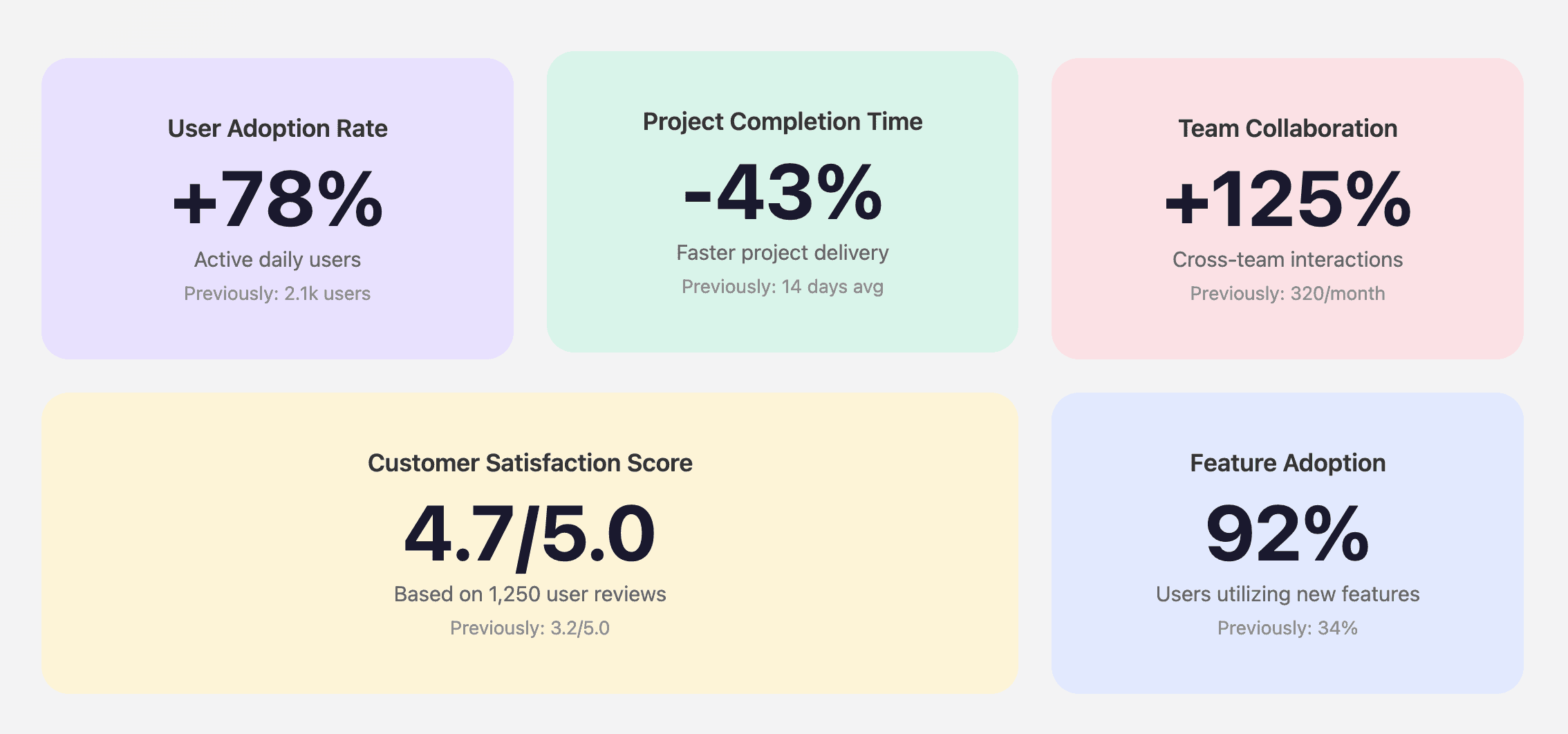
Overall Production After Launch

Post-launch metrics demonstrate significant improvements in user adoption, productivity, and system performance.


Overall Production After Launch

Post-launch metrics demonstrate significant improvements in user adoption, productivity, and system performance.


Overall Production After Launch

Post-launch metrics demonstrate significant improvements in user adoption, productivity, and system performance.


Next Project

Next Project

Next Project

Coinstar

Coinstar

Coinstar

->

->

->

Ray Apollo © 2023

Ray Apollo © 2023

Ray Apollo © 2023