

Overwatch Digital Health Platform
Mobile App
Mobile App
Mobile App


Overview
Overview
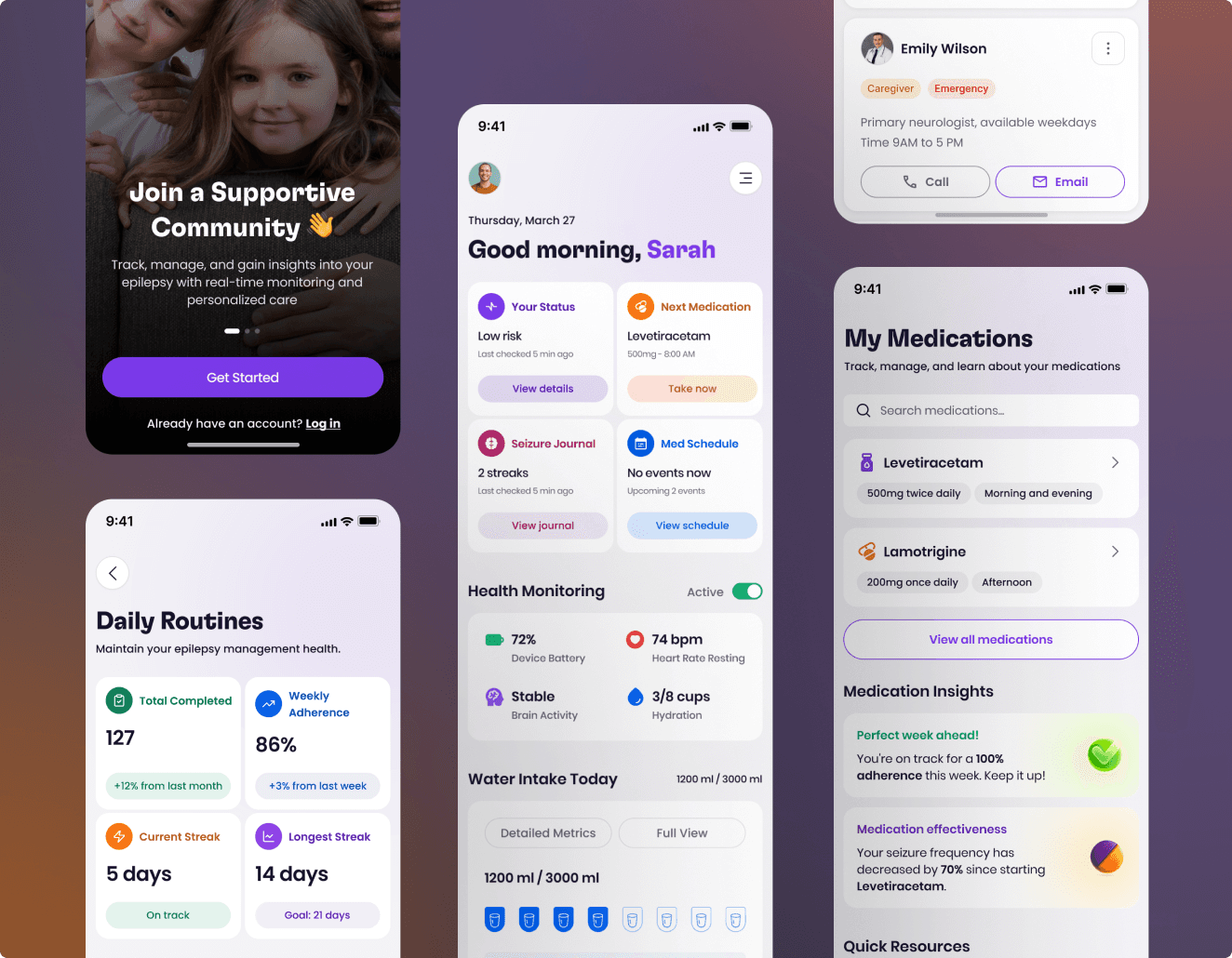
Overwatch is a seizure-detection application designed to help patients with epilepsy (and their families or caregivers) track, monitor, and understand seizure events in real time. The app uses motion detection, machine learning, and location tracking to send notifications or alerts, offering support in preventing injuries or unattended seizures.
Originally launched in a basic format, Overwatch had a few strong points—real-time seizure alerts and location monitoring—but it needed significant improvements to address user needs.


Tech Stack

Figma
Design Tool

React Native
User Interface Library
Xcode
IDE
Tech Stack

Figma
Design Tool

React Native
User Interface Library

Xcode
IDE
Tech Stack

Figma
Design Tool

React Native
User Interface Library

Xcode
IDE
Tech Stack

Figma
Design Tool

React Native
User Interface Library

Xcode
IDE
ROLE
ROLE
UX Designer & Researcher
DURATION
DURATION
8 Month
PLATFORM
PLATFORM
Medical Service


Process
Process
Design Process
My design process for the Overwatch Digital Health app was rooted in iteration and empathy. I began by engaging with users to understand their daily challenges, which shaped the creation of personas and journey maps. These insights became the foundation for early wireframes and prototypes.
Through ongoing usability testing, I refined the designs to improve clarity, usability, and alignment with clinical needs. Close collaboration with developers and healthcare professionals ensured that the solutions were not only intuitive but also practical and clinically relevant. The result was a design that empowers users while effectively supporting epilepsy management.

Design Process
My design process for the Overwatch Digital Health app was rooted in iteration and empathy. I began by engaging with users to understand their daily challenges, which shaped the creation of personas and journey maps. These insights became the foundation for early wireframes and prototypes.
Through ongoing usability testing, I refined the designs to improve clarity, usability, and alignment with clinical needs. Close collaboration with developers and healthcare professionals ensured that the solutions were not only intuitive but also practical and clinically relevant. The result was a design that empowers users while effectively supporting epilepsy management.

Design Process
My design process for the Overwatch Digital Health app was rooted in iteration and empathy. I began by engaging with users to understand their daily challenges, which shaped the creation of personas and journey maps. These insights became the foundation for early wireframes and prototypes.
Through ongoing usability testing, I refined the designs to improve clarity, usability, and alignment with clinical needs. Close collaboration with developers and healthcare professionals ensured that the solutions were not only intuitive but also practical and clinically relevant. The result was a design that empowers users while effectively supporting epilepsy management.

Design Process
My design process for the Overwatch Digital Health app was rooted in iteration and empathy. I began by engaging with users to understand their daily challenges, which shaped the creation of personas and journey maps. These insights became the foundation for early wireframes and prototypes.
Through ongoing usability testing, I refined the designs to improve clarity, usability, and alignment with clinical needs. Close collaboration with developers and healthcare professionals ensured that the solutions were not only intuitive but also practical and clinically relevant. The result was a design that empowers users while effectively supporting epilepsy management.

Before & After Comparison
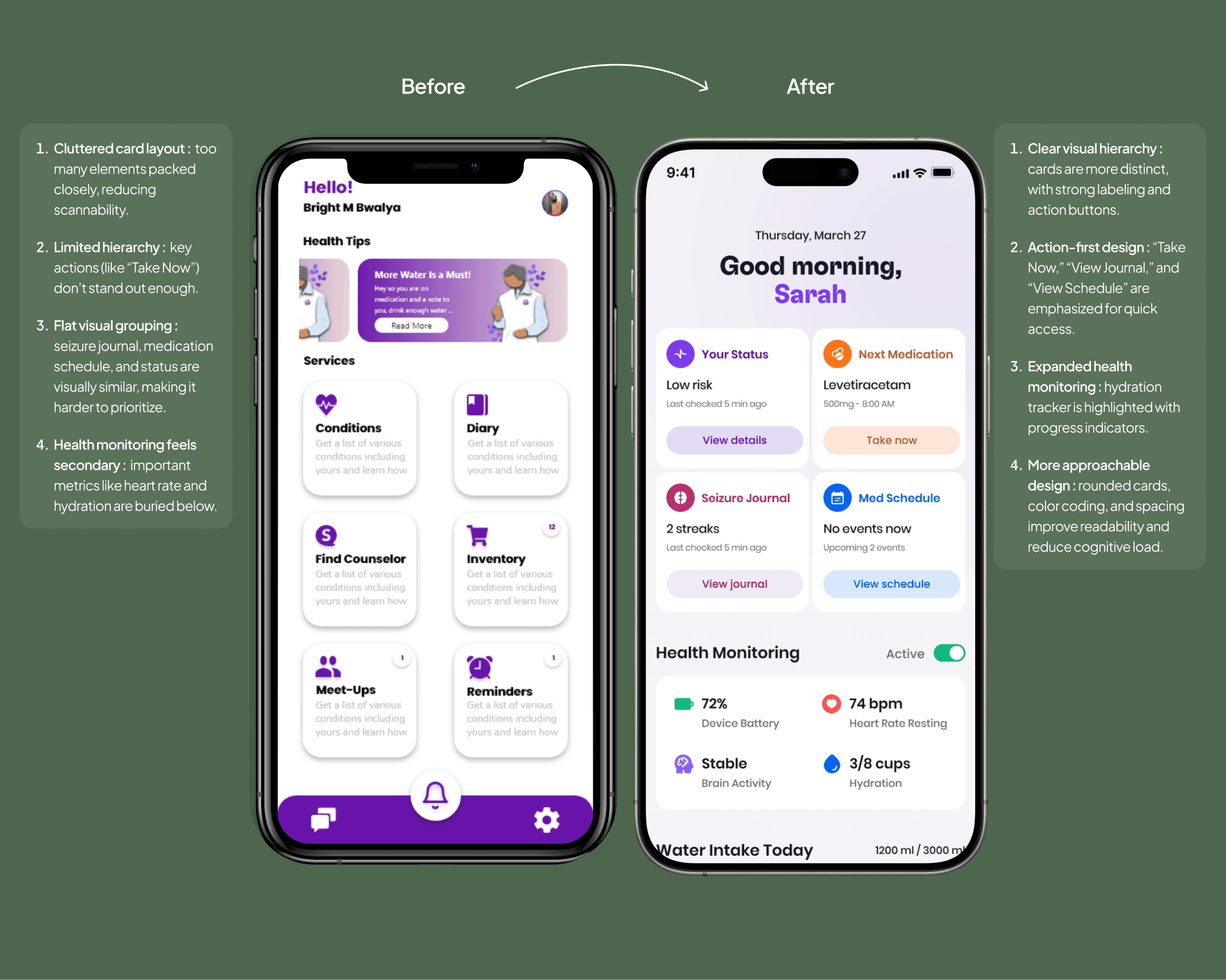
The Before version feels more static and text-heavy, while the After redesign is structured, dynamic, and prioritizes key metrics at a glance. The redesign follows modern health app patterns (dashboard style), giving users more actionable insights upfront.
Before
Linear layout with long sections and little hierarchy.
Important actions (medication, journal, emergency) were buried.
Heavy reliance on text, low scannability.
Seizure logs were detailed but cluttered.
After
Dashboard-style layout with prioritized modules.
Clear CTAs (Take Now, View Journal, Start Session) streamline tasks.
Seizure logs simplified with severity labels and collapsible details.
Stronger visual differentiation through color, spacing, and icons.
Bottom navigation improves quick access to core features.

Before & After Comparison
The Before version feels more static and text-heavy, while the After redesign is structured, dynamic, and prioritizes key metrics at a glance. The redesign follows modern health app patterns (dashboard style), giving users more actionable insights upfront.
Before
Linear layout with long sections and little hierarchy.
Important actions (medication, journal, emergency) were buried.
Heavy reliance on text, low scannability.
Seizure logs were detailed but cluttered.
After
Dashboard-style layout with prioritized modules.
Clear CTAs (Take Now, View Journal, Start Session) streamline tasks.
Seizure logs simplified with severity labels and collapsible details.
Stronger visual differentiation through color, spacing, and icons.
Bottom navigation improves quick access to core features.

Before & After Comparison
The Before version feels more static and text-heavy, while the After redesign is structured, dynamic, and prioritizes key metrics at a glance. The redesign follows modern health app patterns (dashboard style), giving users more actionable insights upfront.
Before
Linear layout with long sections and little hierarchy.
Important actions (medication, journal, emergency) were buried.
Heavy reliance on text, low scannability.
Seizure logs were detailed but cluttered.
After
Dashboard-style layout with prioritized modules.
Clear CTAs (Take Now, View Journal, Start Session) streamline tasks.
Seizure logs simplified with severity labels and collapsible details.
Stronger visual differentiation through color, spacing, and icons.
Bottom navigation improves quick access to core features.

Quantitative Research
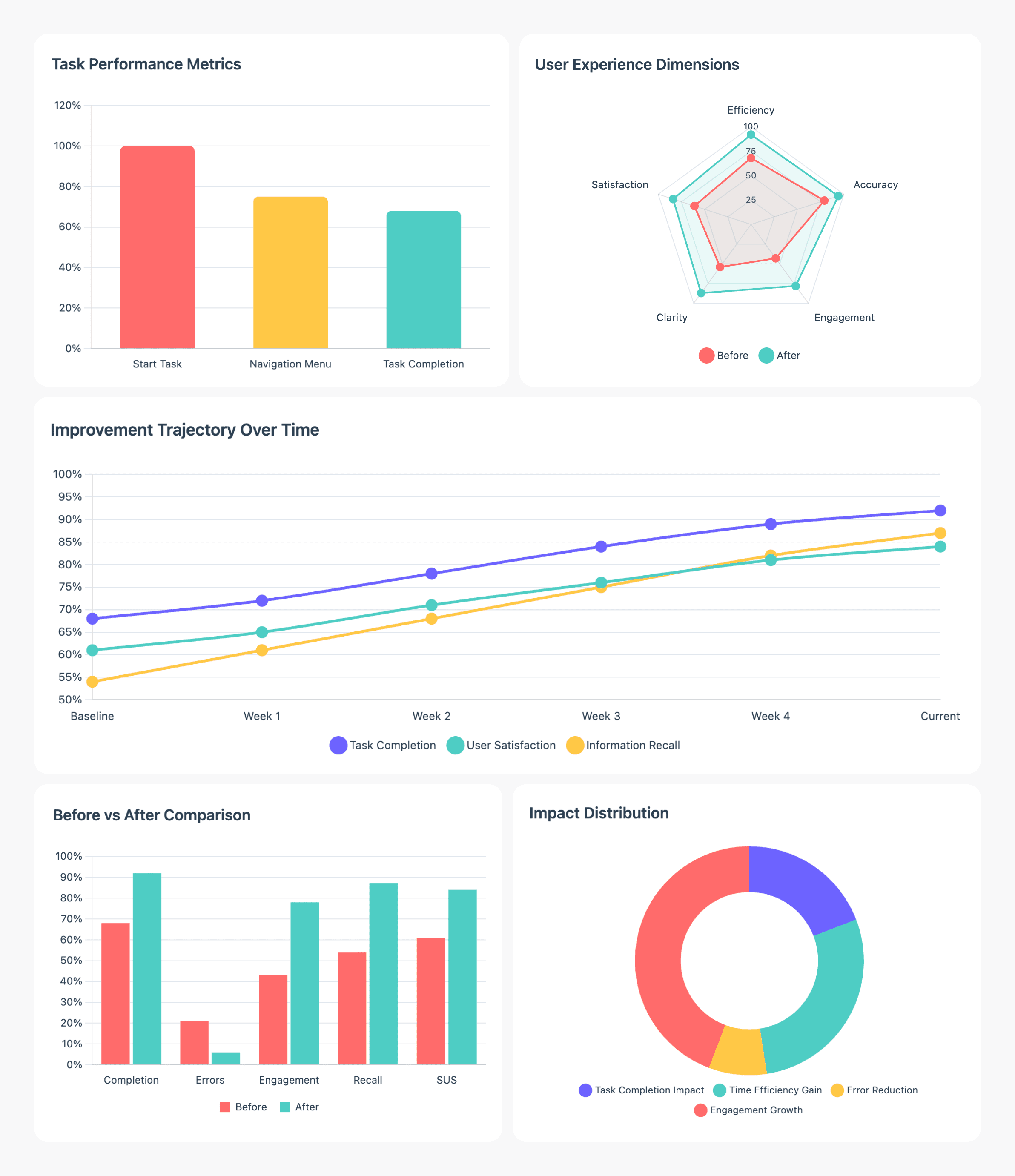
Usability testing showed strong improvements with the redesigned Overwatch Digital Health app. The task error rate decreased to 12%, while average task time improved to 1.3 minutes, highlighting greater efficiency and clarity. The Net Promoter Score (NPS) reached 76%, reflecting high user satisfaction.
Two minor non-critical issues were noted—sync delays with wearables and minor UI overlaps—neither affecting task completion, but providing direction for future refinements.

Quantitative Research
Usability testing showed strong improvements with the redesigned Overwatch Digital Health app. The task error rate decreased to 12%, while average task time improved to 1.3 minutes, highlighting greater efficiency and clarity. The Net Promoter Score (NPS) reached 76%, reflecting high user satisfaction.
Two minor non-critical issues were noted—sync delays with wearables and minor UI overlaps—neither affecting task completion, but providing direction for future refinements.

Quantitative Research
Usability testing showed strong improvements with the redesigned Overwatch Digital Health app. The task error rate decreased to 12%, while average task time improved to 1.3 minutes, highlighting greater efficiency and clarity. The Net Promoter Score (NPS) reached 76%, reflecting high user satisfaction.
Two minor non-critical issues were noted—sync delays with wearables and minor UI overlaps—neither affecting task completion, but providing direction for future refinements.

User Persona
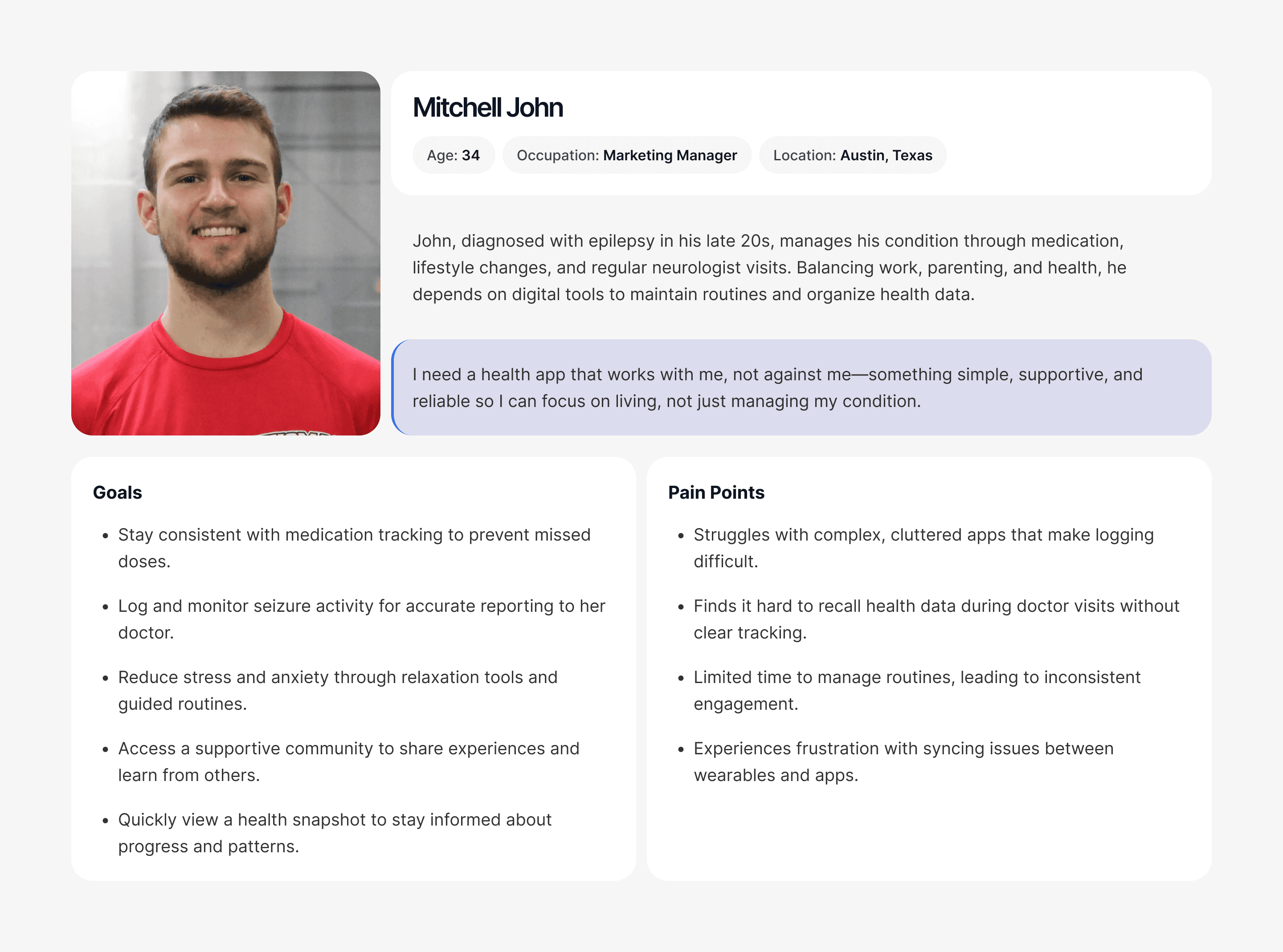
As part of our research, we created two user personas to capture the needs of our core audience. Informed by surveys and interviews, these personas highlight user goals, challenges, and motivations, ensuring the Overwatch Digital Health app redesign stays grounded in real experiences. They served as a foundation for feature prioritization and design decisions, directly addressing key scenarios in epilepsy management.

User Persona
As part of our research, we created two user personas to capture the needs of our core audience. Informed by surveys and interviews, these personas highlight user goals, challenges, and motivations, ensuring the Overwatch Digital Health app redesign stays grounded in real experiences. They served as a foundation for feature prioritization and design decisions, directly addressing key scenarios in epilepsy management.

User Persona
As part of our research, we created two user personas to capture the needs of our core audience. Informed by surveys and interviews, these personas highlight user goals, challenges, and motivations, ensuring the Overwatch Digital Health app redesign stays grounded in real experiences. They served as a foundation for feature prioritization and design decisions, directly addressing key scenarios in epilepsy management.

User Survey
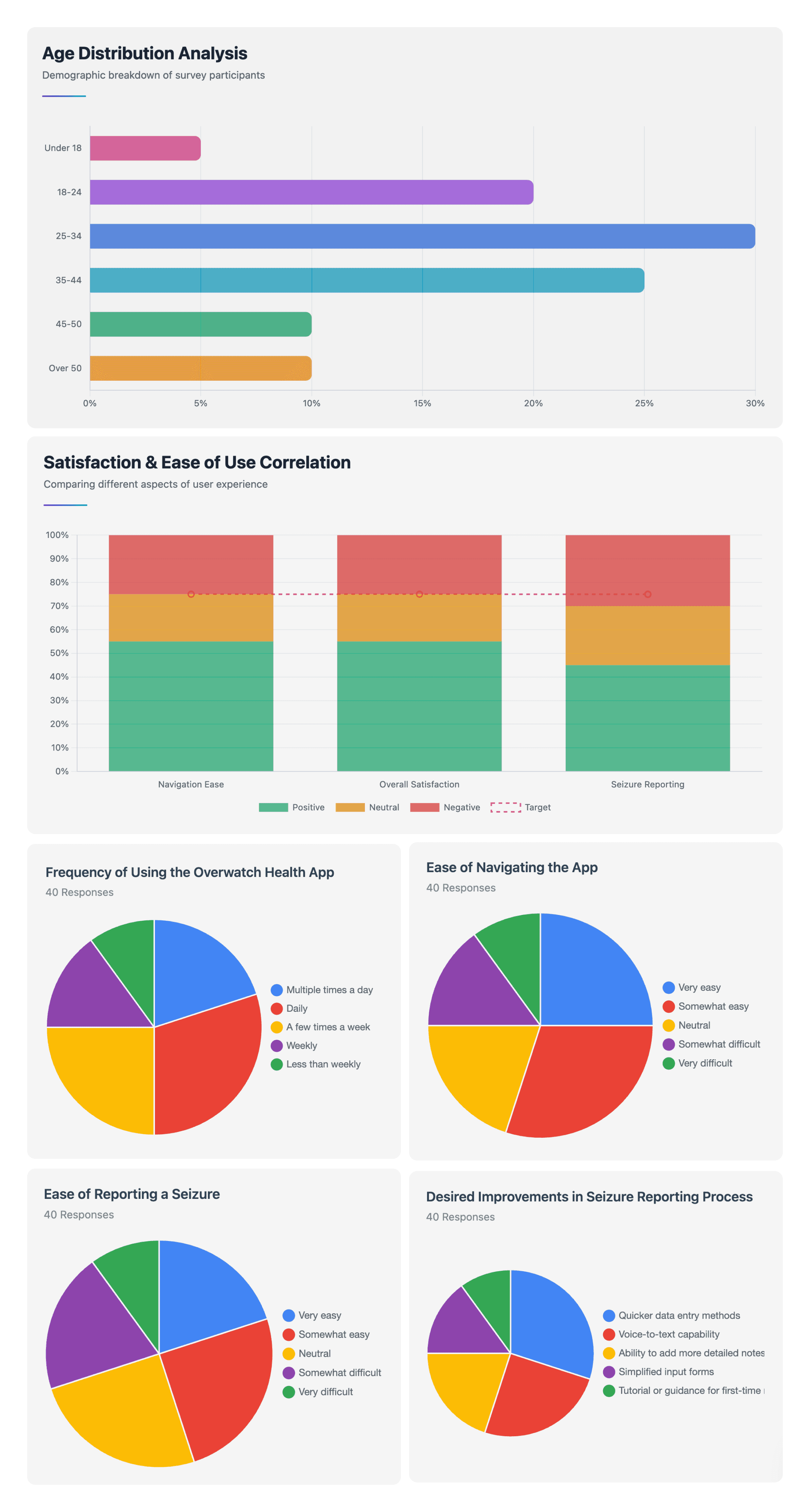
Our survey revealed that most users, particularly those aged 25–34, rely on the app daily or weekly as part of their daily health routine. While navigation felt easier for many, users highlighted the need for faster seizure reporting, asking for features like voice-to-text and simpler input forms. These insights guided our redesign to make the app more intuitive and supportive in real-life use.

User Survey
Our survey revealed that most users, particularly those aged 25–34, rely on the app daily or weekly as part of their daily health routine. While navigation felt easier for many, users highlighted the need for faster seizure reporting, asking for features like voice-to-text and simpler input forms. These insights guided our redesign to make the app more intuitive and supportive in real-life use.

User Survey
Our survey revealed that most users, particularly those aged 25–34, rely on the app daily or weekly as part of their daily health routine. While navigation felt easier for many, users highlighted the need for faster seizure reporting, asking for features like voice-to-text and simpler input forms. These insights guided our redesign to make the app more intuitive and supportive in real-life use.

User Flow
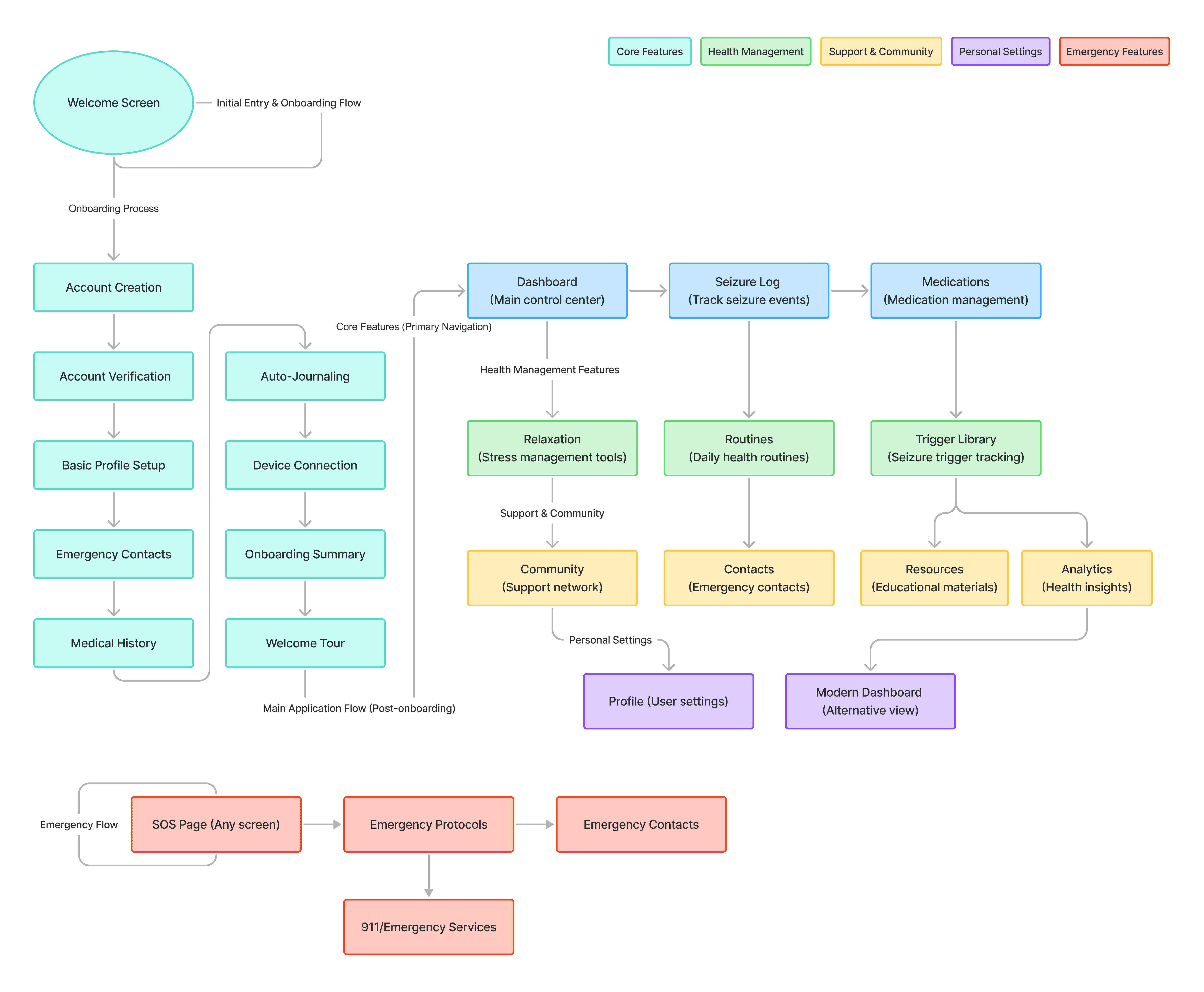
The user flow for the Overwatch Digital Health app maps the journey from onboarding to daily engagement. Starting at the splash screen, users can sign up, log in, and complete profile setup, including device integration and notification preferences.
From the dashboard, they access key features such as medication reminders, seizure logging, daily routines, and stress management tools. Users can also explore the community hub, track progress through reports and insights, and connect with caregivers or doctors via contacts.
This streamlined flow ensures users can log health data, manage medications, reduce stress, and access support within a single, integrated experience.

User Flow
The user flow for the Overwatch Digital Health app maps the journey from onboarding to daily engagement. Starting at the splash screen, users can sign up, log in, and complete profile setup, including device integration and notification preferences.
From the dashboard, they access key features such as medication reminders, seizure logging, daily routines, and stress management tools. Users can also explore the community hub, track progress through reports and insights, and connect with caregivers or doctors via contacts.
This streamlined flow ensures users can log health data, manage medications, reduce stress, and access support within a single, integrated experience.

User Flow
The user flow for the Overwatch Digital Health app maps the journey from onboarding to daily engagement. Starting at the splash screen, users can sign up, log in, and complete profile setup, including device integration and notification preferences.
From the dashboard, they access key features such as medication reminders, seizure logging, daily routines, and stress management tools. Users can also explore the community hub, track progress through reports and insights, and connect with caregivers or doctors via contacts.
This streamlined flow ensures users can log health data, manage medications, reduce stress, and access support within a single, integrated experience.

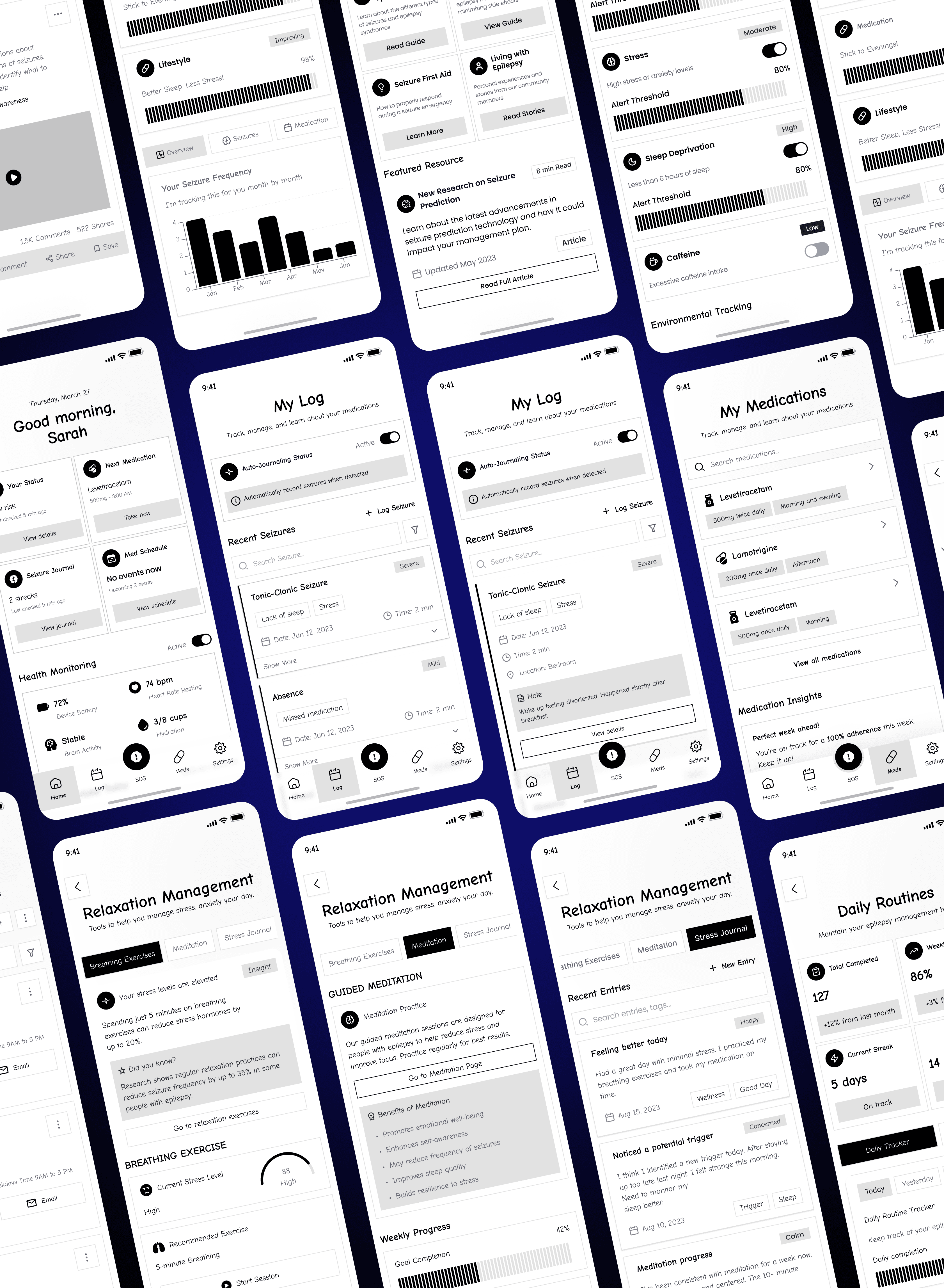
Wireframe
The wireframes depict a comprehensive suite of screens for the Overwatch Digital Health app, outlining a user-centric approach to epilepsy management. From onboarding to detailed medical profiling, emergency contacts, and alert settings, each screen is designed for ease and accessibility. They collectively streamline the management process, enhancing user engagement and ensuring crucial health information is at the user's fingertips. This layout is crafted to provide a seamless and supportive experience for users as they navigate their health journey with epilepsy

Wireframe
The wireframes depict a comprehensive suite of screens for the Overwatch Digital Health app, outlining a user-centric approach to epilepsy management. From onboarding to detailed medical profiling, emergency contacts, and alert settings, each screen is designed for ease and accessibility. They collectively streamline the management process, enhancing user engagement and ensuring crucial health information is at the user's fingertips. This layout is crafted to provide a seamless and supportive experience for users as they navigate their health journey with epilepsy

Wireframe
The wireframes depict a comprehensive suite of screens for the Overwatch Digital Health app, outlining a user-centric approach to epilepsy management. From onboarding to detailed medical profiling, emergency contacts, and alert settings, each screen is designed for ease and accessibility. They collectively streamline the management process, enhancing user engagement and ensuring crucial health information is at the user's fingertips. This layout is crafted to provide a seamless and supportive experience for users as they navigate their health journey with epilepsy

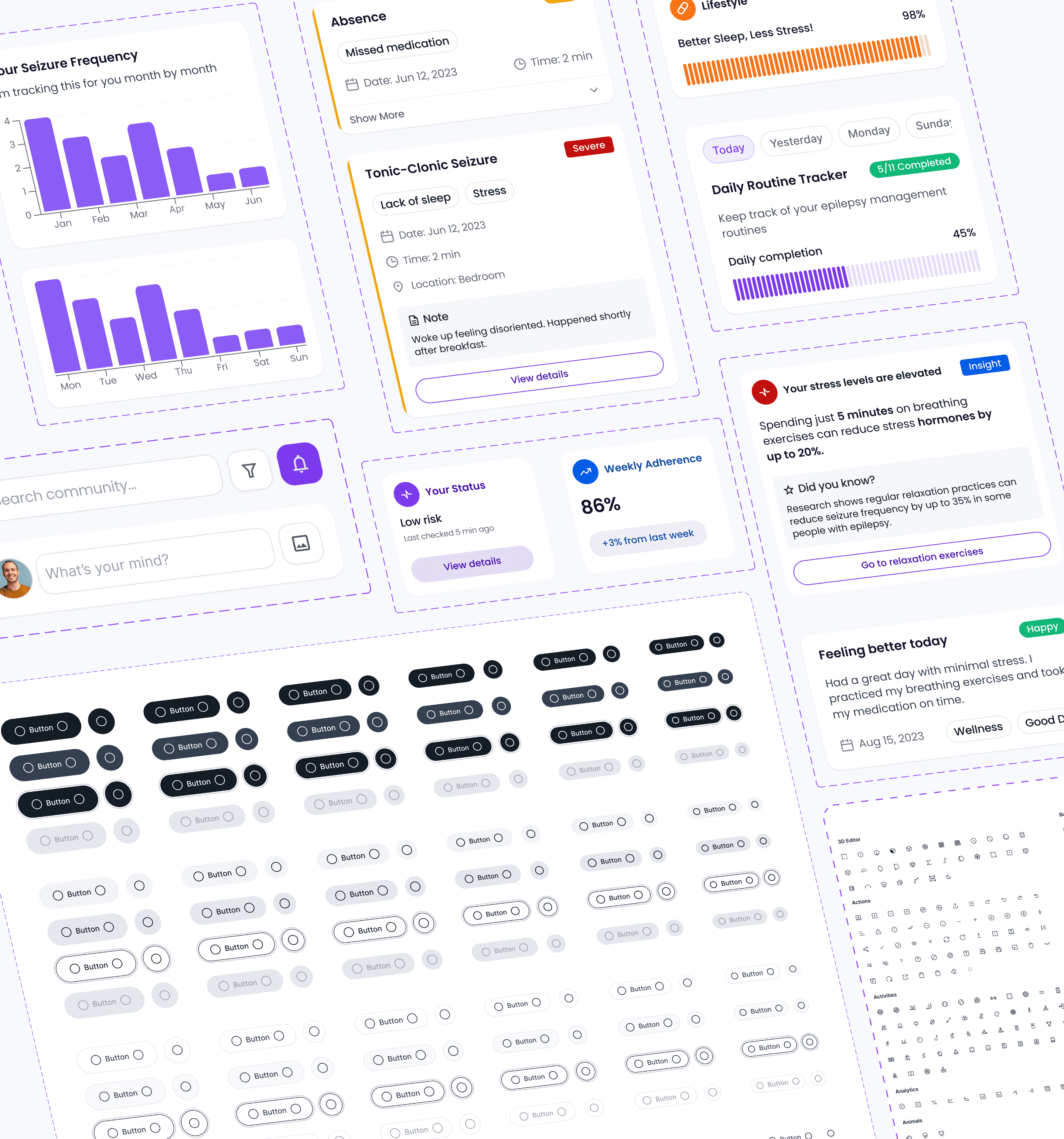
Design System
We built a simple, reusable design system that keeps the app consistent and easy to scale. From buttons and inputs to charts and trackers, every component works together to create a clear, accessible, and user-friendly experience.

Design System
We built a simple, reusable design system that keeps the app consistent and easy to scale. From buttons and inputs to charts and trackers, every component works together to create a clear, accessible, and user-friendly experience.

Design System
We built a simple, reusable design system that keeps the app consistent and easy to scale. From buttons and inputs to charts and trackers, every component works together to create a clear, accessible, and user-friendly experience.

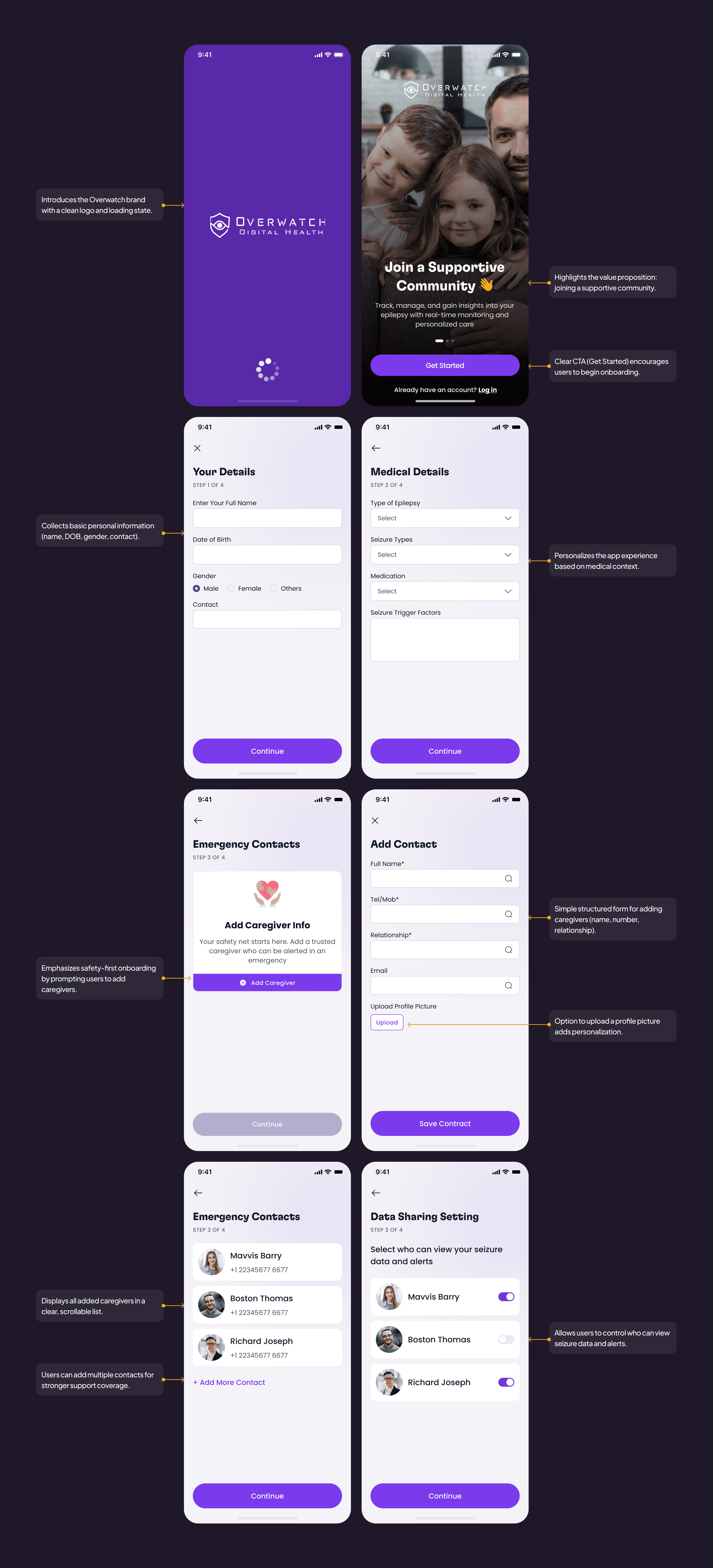
Simplifying Onboarding
This onboarding flow balances simplicity, safety, and personalization, ensuring users feel supported and confident from their very first interaction.
Welcoming Experience: Starts with a friendly welcome screen and clear value proposition (“Join a Supportive Community”), helping new users understand the app’s purpose.
Step-by-Step Guidance: The onboarding is broken into four clear steps (personal details, medical details, emergency contacts, data sharing), reducing cognitive load and keeping progress visible.
Personalization & Relevance: Collects essential medical details (e.g., epilepsy type, medications, triggers) to personalize health insights and ensure the app adapts to the user's needs.
Safety-First Design: Dedicated emergency contact setup ensures caregivers are added upfront, creating trust and preparedness from the start.
Data Sharing Transparency: Users have the option to choose who can view their seizure data, thereby reinforcing privacy, security, and control—essential for health-related apps.
Simple & Consistent UI: Clear forms, intuitive inputs, and consistent CTAs (“Continue,” “Save Contact”) guide users smoothly without confusion.

Simplifying Onboarding
This onboarding flow balances simplicity, safety, and personalization, ensuring users feel supported and confident from their very first interaction.
Welcoming Experience: Starts with a friendly welcome screen and clear value proposition (“Join a Supportive Community”), helping new users understand the app’s purpose.
Step-by-Step Guidance: The onboarding is broken into four clear steps (personal details, medical details, emergency contacts, data sharing), reducing cognitive load and keeping progress visible.
Personalization & Relevance: Collects essential medical details (e.g., epilepsy type, medications, triggers) to personalize health insights and ensure the app adapts to the user's needs.
Safety-First Design: Dedicated emergency contact setup ensures caregivers are added upfront, creating trust and preparedness from the start.
Data Sharing Transparency: Users have the option to choose who can view their seizure data, thereby reinforcing privacy, security, and control—essential for health-related apps.
Simple & Consistent UI: Clear forms, intuitive inputs, and consistent CTAs (“Continue,” “Save Contact”) guide users smoothly without confusion.

Simplifying Onboarding
This onboarding flow balances simplicity, safety, and personalization, ensuring users feel supported and confident from their very first interaction.
Welcoming Experience: Starts with a friendly welcome screen and clear value proposition (“Join a Supportive Community”), helping new users understand the app’s purpose.
Step-by-Step Guidance: The onboarding is broken into four clear steps (personal details, medical details, emergency contacts, data sharing), reducing cognitive load and keeping progress visible.
Personalization & Relevance: Collects essential medical details (e.g., epilepsy type, medications, triggers) to personalize health insights and ensure the app adapts to the user's needs.
Safety-First Design: Dedicated emergency contact setup ensures caregivers are added upfront, creating trust and preparedness from the start.
Data Sharing Transparency: Users have the option to choose who can view their seizure data, thereby reinforcing privacy, security, and control—essential for health-related apps.
Simple & Consistent UI: Clear forms, intuitive inputs, and consistent CTAs (“Continue,” “Save Contact”) guide users smoothly without confusion.

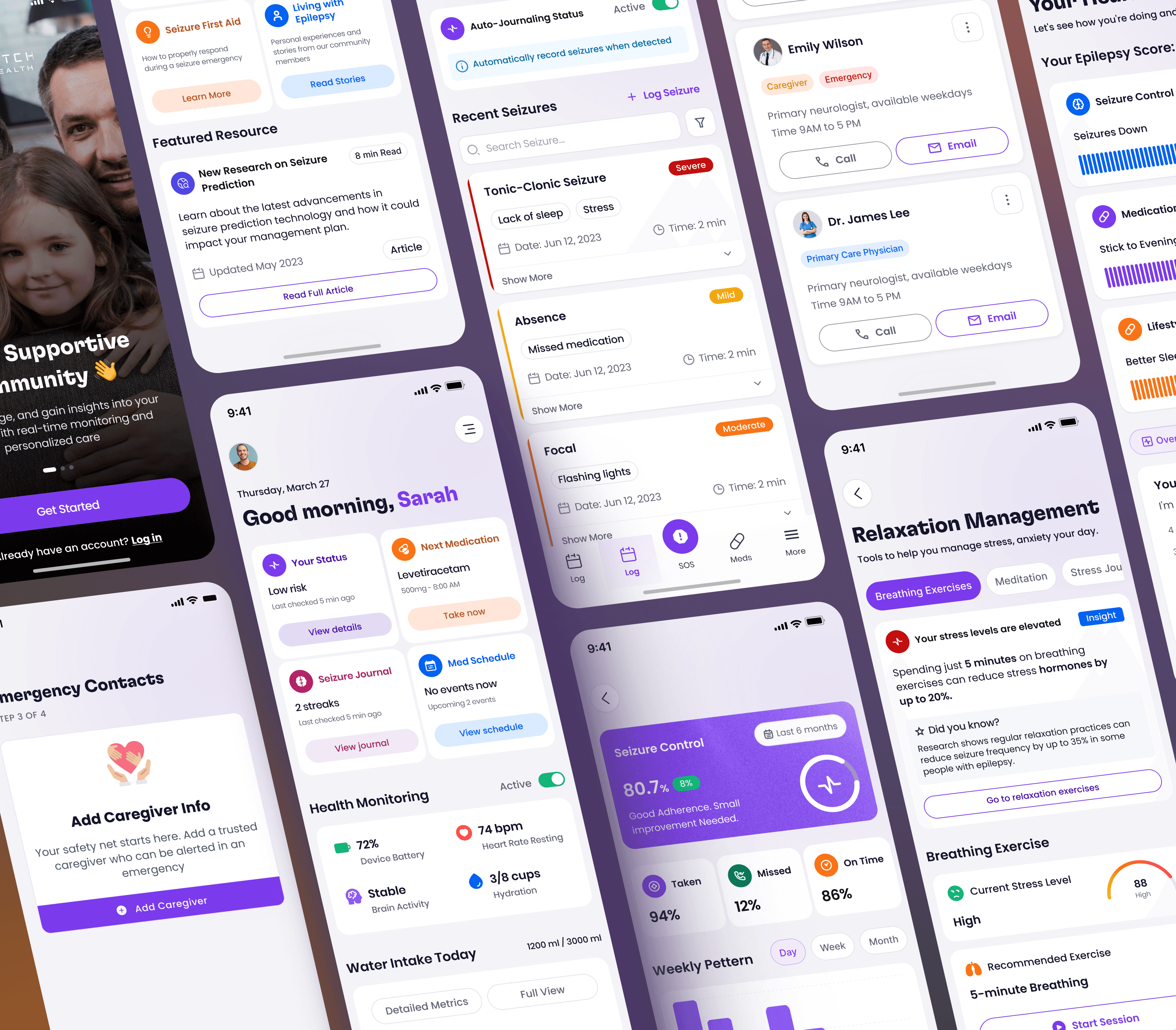
Home Screen Enhancements
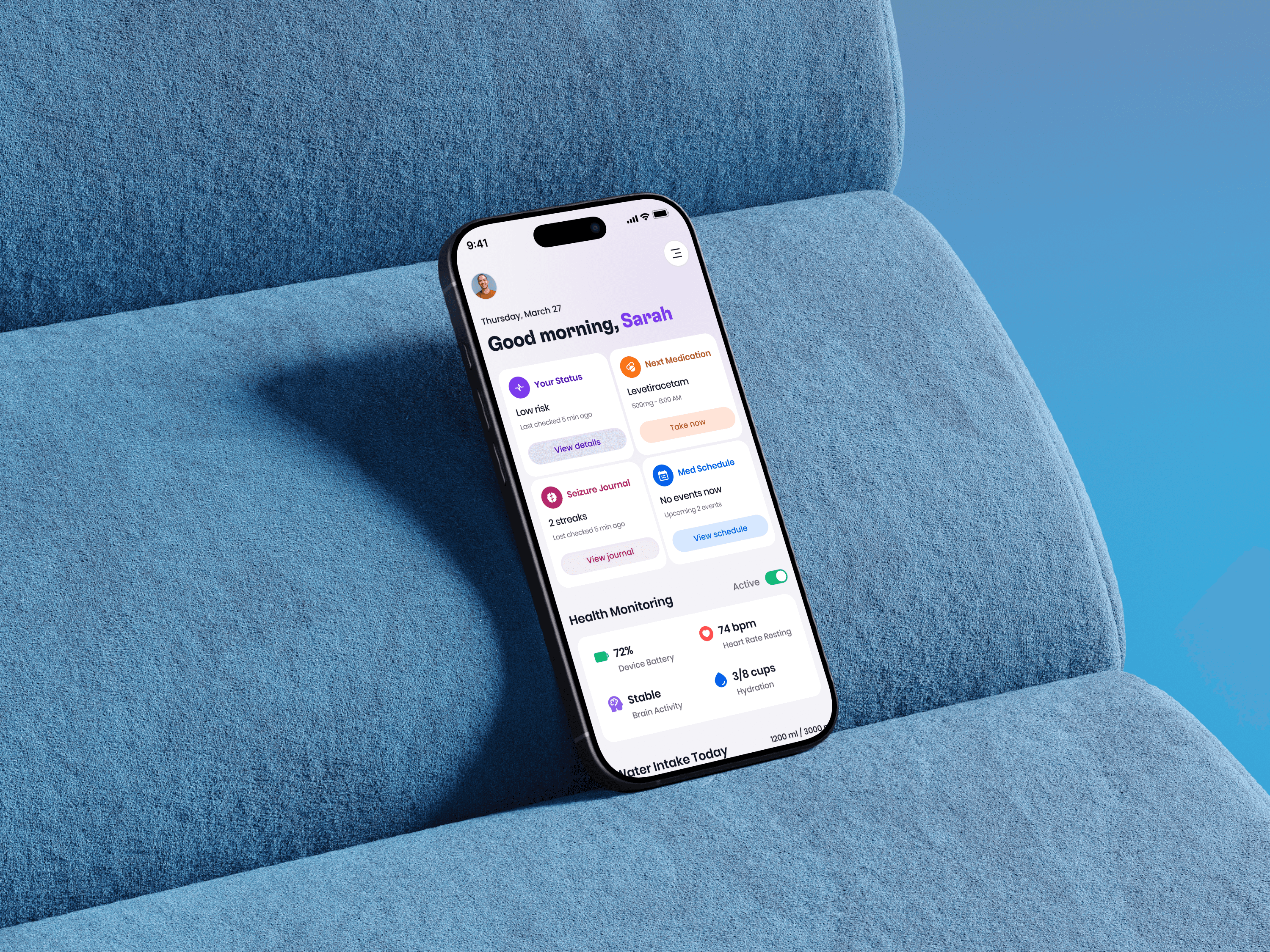
Personalized Dashboard: A welcoming greeting paired with top-priority health actions (status, next medication, seizure journal, and schedule) ensures users can take quick, meaningful steps each day.
Health Monitoring: Key vitals such as device battery, heart rate, brain activity, and hydration are displayed with clear icons and a reassurance toggle showing active monitoring.
Water Intake Tracker: A simple progress system with visual cups encourages daily hydration, supported by both detailed and full-view options for flexibility.
Relaxation & Stress Management: Real-time stress indicators paired with guided breathing exercises help users manage triggers and maintain balance.
Recent Seizure Logs: Clean summaries with severity labels (e.g., Severe) and contextual details like triggers, date, and duration give users and caregivers quick access to critical information.
Emergency Readiness: The SOS button in the bottom navigation is centrally emphasized, ensuring immediate access during urgent situations.

Home Screen Enhancements
Personalized Dashboard: A welcoming greeting paired with top-priority health actions (status, next medication, seizure journal, and schedule) ensures users can take quick, meaningful steps each day.
Health Monitoring: Key vitals such as device battery, heart rate, brain activity, and hydration are displayed with clear icons and a reassurance toggle showing active monitoring.
Water Intake Tracker: A simple progress system with visual cups encourages daily hydration, supported by both detailed and full-view options for flexibility.
Relaxation & Stress Management: Real-time stress indicators paired with guided breathing exercises help users manage triggers and maintain balance.
Recent Seizure Logs: Clean summaries with severity labels (e.g., Severe) and contextual details like triggers, date, and duration give users and caregivers quick access to critical information.
Emergency Readiness: The SOS button in the bottom navigation is centrally emphasized, ensuring immediate access during urgent situations.

Home Screen Enhancements
Personalized Dashboard: A welcoming greeting paired with top-priority health actions (status, next medication, seizure journal, and schedule) ensures users can take quick, meaningful steps each day.
Health Monitoring: Key vitals such as device battery, heart rate, brain activity, and hydration are displayed with clear icons and a reassurance toggle showing active monitoring.
Water Intake Tracker: A simple progress system with visual cups encourages daily hydration, supported by both detailed and full-view options for flexibility.
Relaxation & Stress Management: Real-time stress indicators paired with guided breathing exercises help users manage triggers and maintain balance.
Recent Seizure Logs: Clean summaries with severity labels (e.g., Severe) and contextual details like triggers, date, and duration give users and caregivers quick access to critical information.
Emergency Readiness: The SOS button in the bottom navigation is centrally emphasized, ensuring immediate access during urgent situations.


Usability Test
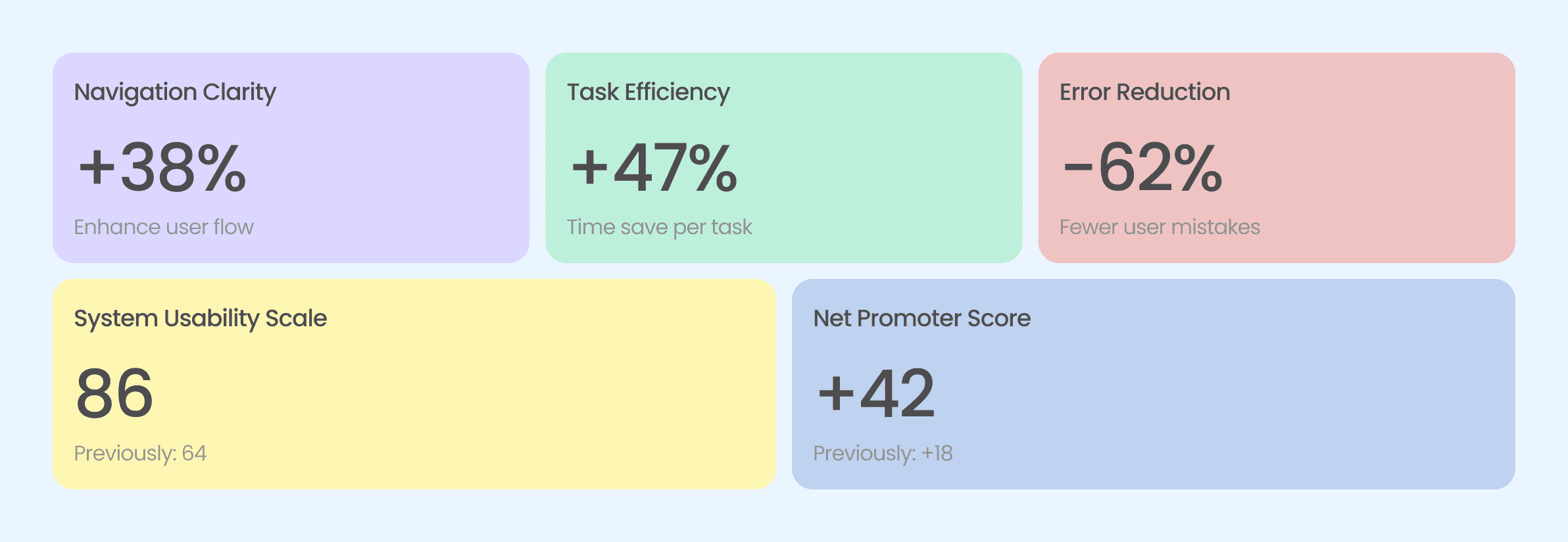
Visualizing the quantifiable improvements from our redesign across key metrics

Usability Test
Visualizing the quantifiable improvements from our redesign across key metrics

Usability Test
Visualizing the quantifiable improvements from our redesign across key metrics

Overall Improvements After Redesign
A concise overview highlighting key enhancements in usability, visual appeal, and performance achieved through the redesign.

Overall Improvements After Redesign
A concise overview highlighting key enhancements in usability, visual appeal, and performance achieved through the redesign.

Overall Improvements After Redesign
A concise overview highlighting key enhancements in usability, visual appeal, and performance achieved through the redesign.